
Advanced Text Tagging & Parts of Speech Analysis
Identify and highlight every part of speech in your writing — with rich text formatting preserved. See nouns, verbs, pronouns, and more highlighted directly in your formatted document, complete with deeper sub-categorization.
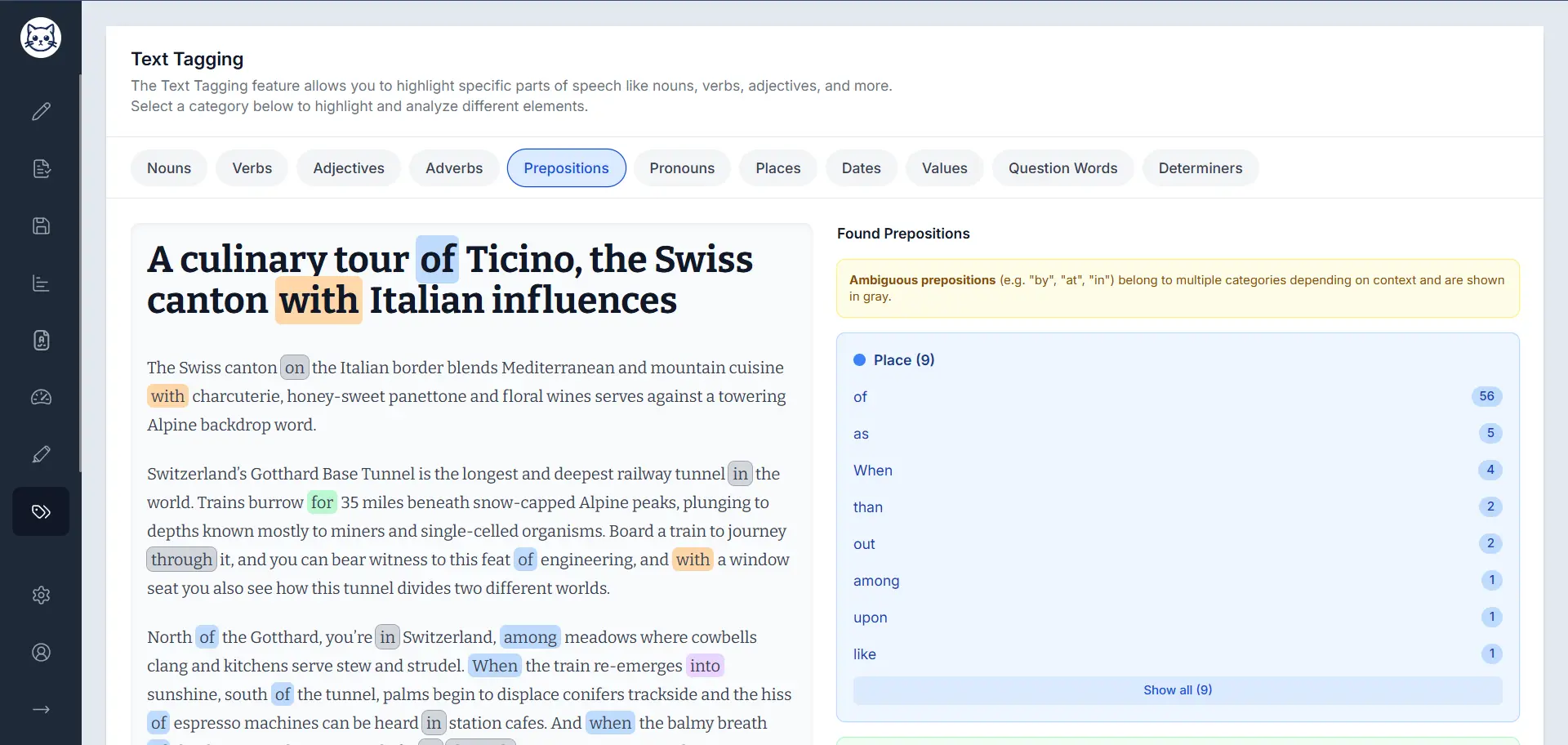
Extensive POS Highlighting
Text Tagging identifies and highlights eleven categories of parts of speech. Several categories go further — breaking words down into meaningful sub-types so you can understand exactly how language is being used in your text.
Nouns
Identify the key subjects and objects in your writing, broken down into two distinct types.
Verbs
Understand the actions and states in your writing, classified into three functional roles.
Pronouns
Track pronoun usage in your writing across three categories for a nuanced perspective.
Adjectives
Mark descriptive words to see the elements that add detail and color to your text.
Adverbs
Highlight adverbs for a deeper analysis of how actions and qualities are modified in your writing.
Prepositions
Identify prepositions to gain insights into the syntactic structure and relationships between words.
Places
Automatically highlight geographical locations and place names mentioned in your text.
Dates
Identify and mark dates in various formats for clear temporal analysis of your writing.
Values
Highlight numerical values and quantities to easily spot data points and measurements.
Question Words
Spot interrogative words like who, what, where, when, and why throughout your text.
Determiners
Mark determiners for a complete grammatical analysis of your sentences and sentence structure.
Highlighting That Respects Your Formatting
Text Tagging renders your content in a rich text editor, so highlights appear on your actual formatted document — not a stripped-down plain text version.
Highlights on Your Actual Document
Each part-of-speech view displays your content with all its original formatting intact — headings, bold and italic text, lists, and more — so the highlights appear exactly where you'd expect them.
Headings and structure preserved
Headings, paragraphs, and document structure remain intact as highlights are applied.
Bold and italic text kept
Inline formatting like bold and italics is displayed alongside the POS highlights without conflict.
- Two-Column Layout
Each tab shows your formatted text on the left and the statistics panel on the right, so you can read and analyze simultaneously.
- Color-Coded Categories
Sub-categories like Common vs. Proper nouns, or Action vs. Linking verbs, are highlighted in distinct colors so differences are immediately visible.
Powered by Advanced Technology
Our text tagging feature uses the Compromise JavaScript library for accurate and efficient parts-of-speech detection, combined with a rich text rendering layer that keeps your document formatting intact.
Premium Feature with Free Access
Text Tagging is a premium feature that's unlocked for all users twice per week. Get full access to all parts of speech highlighting and detailed analysis without a subscription.
Free Access
Available twice weekly for all users. No subscription required to try the complete feature.
Premium Access
Unlimited access to all text tagging categories and advanced analysis features.
Enhance Your Text Analysis Today
See every part of speech highlighted in your formatted document, understand how nouns, verbs, and pronouns break down into sub-types, and gain a richer understanding of how your writing works.