Your draft, by the numbers,updated as you type
Word and character counts, sentences and paragraphs, sentence lengths, and how long your text takes to read, speak, and write. It all sits in the Stats panel of Gorby's Write view, right next to your text.
Free to use Updates as you type Web and Windows app
 Why short sentences win - Gorby
Stats
Every number updates as you type.
Counts
- 148
- Words
- 788
- Characters
- 14
- Sentences
- 6
- Paragraphs
97 unique
646 without spaces
Average word 4.2 characters
Estimated time
- Reading 37 sec
- Speaking 49 sec
- Writing 4 min
Sentence length
- Shortest
- 2
- Average
- 10.6
- Longest
- 26
- 0-5 21%
- 6-10 43%
- 11-15 7%
- 16-20 14%
- 21-30 14%
- 31+ 0%
Paste your own text to see its numbers.
Try it: type in the editor or paste your own text. Every number updates as you go, and Listen reads your text aloud.
Estimated time
How long will it take?
Gorby divides your word count by a typical pace: 240 words per minute for reading, 180 for speaking, and 40 for writing. The results show up in the Stats panel, and the reading time also sits in the top bar.
Everyone's pace is different, so you can set your own speeds in Settings and every estimate follows. Try it with the sliders.
Why it matters
Speaking time tells you if your talk fits a 10-minute slot. Reading time is what readers check before they commit to an article. Writing time helps you plan your next session.
- 5 min
240 words per minute
- 7 min
180 words per minute
- 30 min
40 words per minute
Gorby's defaults: 240 reading, 180 speaking, 40 writing.
How it works
Every number, one glance away
- 1
Write or paste
Start typing in the Write view, or paste a draft from anywhere. Gorby counts as you go.
- 2
Glance at the top bar
Your word count, reading time, and readability score stay at the top, even when the side panel is closed.
- 3
Open Stats
Click Stats for every count, estimated time, and sentence length, plus a Listen button to hear your text.
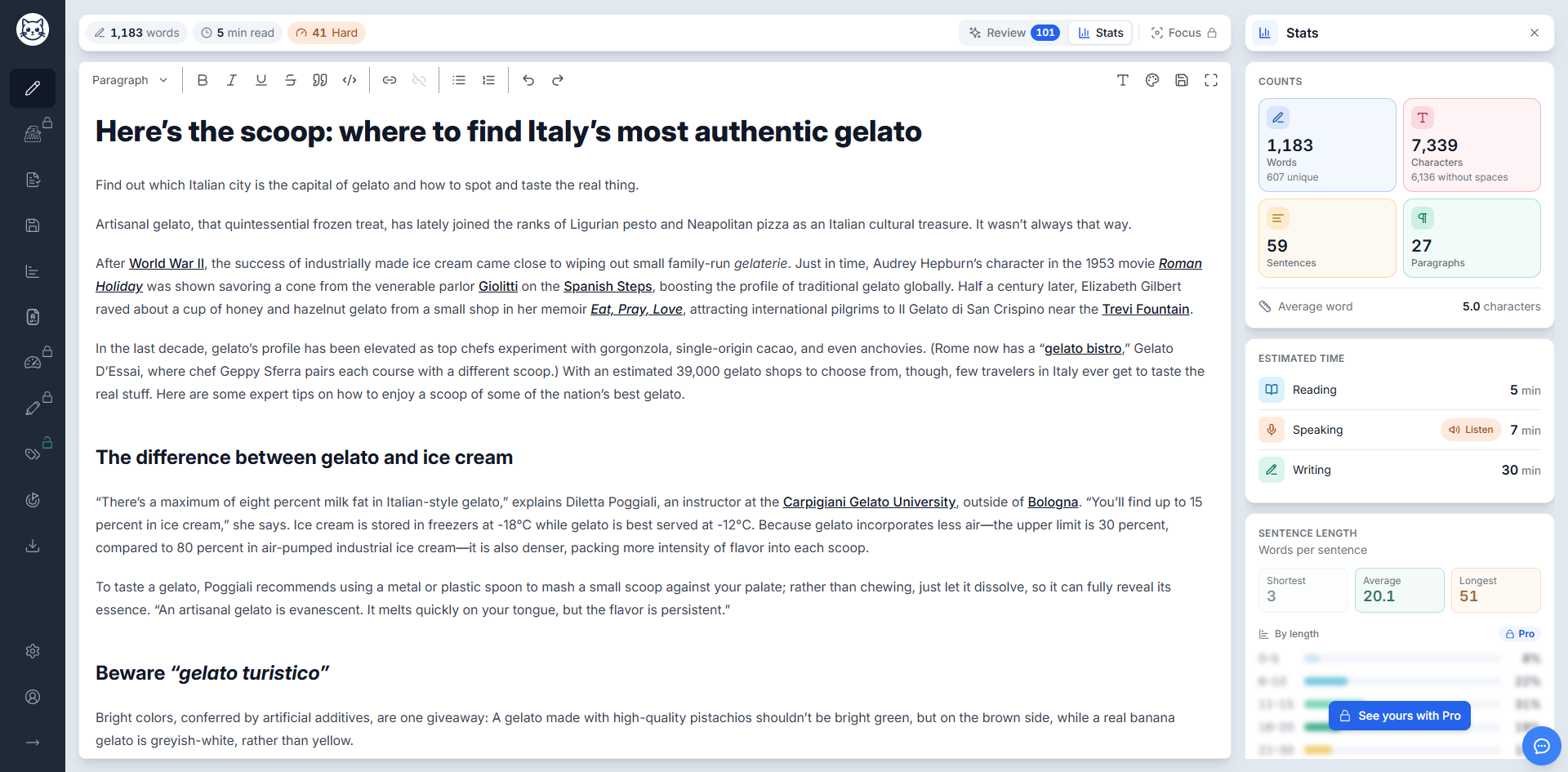
What you get
The numbers that matter, next to your words
Word limits, time slots, and character caps are easier to hit when you can see where you stand.
Words and characters
Total and unique words, plus characters with and without spaces, for word limits, abstracts, and character caps.
Sentences and paragraphs
Count both as you write and keep long documents organized.
Sentence and word length
Your shortest, average, and longest sentence, plus your average word length, so you can see the shape of your writing.
Reading, speaking, and writing time
Estimates at Gorby's default speeds, or at your own pace once you set it in Settings.
Sentences by length
With Pro, see how your sentences spread across length ranges and spot when too many of them run long.
Always in view
Word count, reading time, and readability stay in the top bar, even when the Stats panel is closed.
The details
What each number means
Every stat in the panel, explained. Need just one number without opening the editor? Most of them have a free calculator too.
- Unique words
- How many different words you used, each counted once. A low share of unique words can point to repetition.
- Characters without spaces
- The same count with spaces left out, the way many forms and platforms measure length.
- Paragraphs
- The number of paragraphs, to help you keep a long document in shape.
- Free paragraph counter
- Shortest and longest sentence
- The number of words in your shortest and your longest sentence.
- Average sentence length
- The average number of words per sentence.
- Free average sentence length calculator
- Average word length
- The average length of your words, in characters.
- Free average word length calculator
- Reading time
- How long it takes to read your text, at 240 words per minute by default.
- Free reading time calculator
- Speaking time
- How long it takes to say your text out loud, at 180 words per minute by default.
- Free speaking time calculator
- Writing time
- Roughly how long it takes to write your text, at 40 words per minute by default.
- Free writing time estimator
Text-to-speech
Hear your draft first
Your ear catches what your eyes skip: missing words, doubled words, and sentences that run out of breath.
- 1 Full text playback Press Listen next to the speaking time in the Stats panel to hear your whole text.
- 2 Selective reading Select a sentence, a paragraph, or any passage to hear just that part.
- 3 Voice and speed control Choose from the voices on your device and set the speech rate from 0.5x to 2x.
Speech rate
Uses your browser's voices, just like Gorby.
When listening helps
- Presentation prep Hear your talk or speech before you give it.
- Proofreading Catch missing words, doubled words, and awkward phrasing.
- Accessibility Get audio output for low vision or reading difficulties.
- Flow and rhythm Hear where sentences drag or run out of breath.
Make it yours
A Write view that fits you
Themes restyle the whole Write view, Stats panel included. Settings let you match the time estimates to your pace and set up the editor the way you like it.
- Reading, speaking, and writing speeds
- Font size and family
- The built-in spellchecker, on or off
- Themes for the whole Write view
The clean, balanced Gorby look most writers start with.
Fewer lines and less clutter, so your words do the talking.
Warm colors and classic type, inspired by traditional writing rooms.
A modern, translucent look with soft depth.
A scholarly, professional style for research and formal writing.
Pick any theme in Settings and the whole view changes right away.
Stats is one part of the Write view
The same view has panels for reviewing and focusing, and your stats go into reports too.
Keep polishing
Pairs well with
Readability Metrics
Scores your whole text with formulas like Flesch-Kincaid, Coleman-Liau, and Dale-Chall.
Learn moreText-to-Speech
Listens to your whole draft or just a selection, with your choice of voice and speed.
Learn moreWriting Goals
Sets word count targets and tracks your progress toward them as you write.
Learn moreKeyword Density Analysis
Shows the most frequent words and phrases in your text, for SEO or self-editing.
Learn moreFAQ
Common questions
Need a quick count without opening the editor? Try our free word counter or reading time calculator. Still have a question? Email us at contact@gorby.app.
- What does the Stats panel show?
- Word, character, sentence, and paragraph counts, unique words, average word length, estimated reading, speaking, and writing time, and your shortest, average, and longest sentence. With Pro, it also breaks your sentences down by length.
- Is Text Statistics free?
- Yes. All the counts, time estimates, and sentence length numbers are free. The chart of sentences by length comes with every paid plan.
- How does Gorby estimate reading, speaking, and writing time?
- It divides your word count by a typical speed: 240 words per minute for reading, 180 for speaking, and 40 for writing. A 1,200-word blog post comes out at about a 5 minute read.
- Can I change the speeds?
- Yes. Set your own reading, speaking, and writing speeds in Settings, and every estimate updates to match your pace.
- What are unique words?
- The number of different words in your text, with each word counted once however often it appears. If it is low compared to your total, you may be repeating yourself.
- Do character counts include spaces?
- Gorby shows both. The main count includes spaces, and the number under it leaves them out.
- Can Gorby read my text aloud?
- Yes. Press Listen next to the speaking time to hear your whole text, or select a passage to hear just that part. You can pick a voice and a speech rate from 0.5x to 2x.
- Can I change how the Write view looks?
- Yes. Themes like Minimalist, Writer's Study, Glass, and Academic restyle the whole Write view, Stats panel included. You can also change the font size and family and turn the spellchecker on or off.
- Does it work in the desktop app?
- Yes. Text statistics work the same way in the web app and the Gorby desktop app for Windows.
See your draft by the numbers
Paste your next draft into Gorby and get every count, time estimate, and sentence length at a glance.