Know what to fix next,
and fix it right there
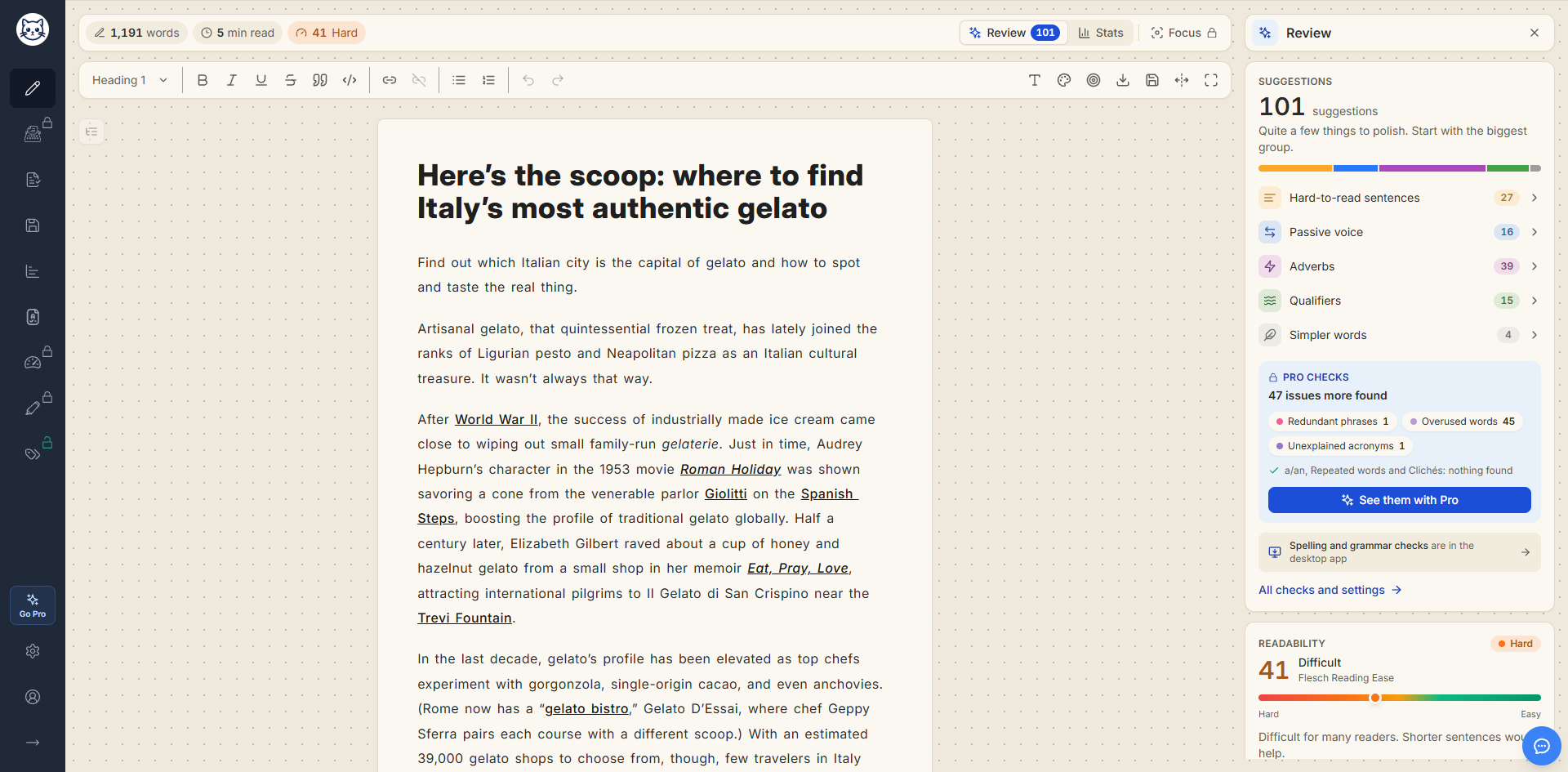
Review lists every suggestion for your draft, from hard sentences to passive voice, with one-click fixes and a readability score. It sits in the side panel of Gorby's Write view, right next to your text.
Free checks included · Updates as you type · Web and Windows app
 Better coffee at home - Gorby
Better coffee at home
Many of us really want a better cup of coffee in the morning. The good news is that you don’t have to utilize fancy gear. The beans were roasted by a small shop down the road, and perhaps that makes the the biggest difference. If you grind the beans right before you brew and keep the water below boiling, the flavor comes through in a way that pre-ground coffee can’t match. Small details add up. At the end of the day, the end result is worth a extra minute. Mistakes will be made along the way. Commence with small changes and taste each cup carefully.
Review
Suggestions update as you type.
Suggestions
12 suggestions
Quite a few things to polish. Start with the biggest group.
The beans were roasted by a small shop down the road
Active voice is usually clearer and shorter.
- Pro checks
The AI fixes in this demo are pre-written.
Try it: open a category, step through its issues, and fix or ignore each one. Click a highlight in the text to jump to it.
The checks
One list, every check
Review brings Gorby's text checks into one list, with a count for each. The colored bar shows where most of your issues are, so you know where to start.
Each check gets its own row. Open one to highlight its issues in your text, and close it again when you're done.
On the free plan
You get the five free checks in full. The Pro checks still run, so you can see how many issues they found and which checks found them.
Suggestions
8 suggestions
A handful of things to polish.
- Hard-to-read sentences 1
- Passive voice 2
- Adverbs 2
- Qualifiers 1
- Simpler words 2
Pro checks
4 issues more found
- Redundant phrases 1
- a/an 1
- Repeated words 1
- Clichés 1
Overused words and Unexplained acronyms: nothing found
See them with ProAll checks and settings
Free checks
Free- Hard-to-read sentences
- Sentences over 20 words, and very hard ones over 30, by default.
- Passive voice
- Phrasing like “the beans were roasted by”, where the active voice is clearer.
- Adverbs
- Words like “really” and “carefully”, where a stronger verb could do the job.
- Qualifiers
- Hedges like “perhaps” and “sort of” that make you sound unsure.
- Simpler words
- “Utilize”, “commence”, and other words with a plainer alternative.
Pro checks
Pro- Redundant phrases
- “End result”, “free gift”, and other phrases that say it twice.
- a/an
- “A hour” or “an user”, where the article doesn’t match the sound.
- Repeated words
- The same word twice in a row, like “the the”.
- Overused words
- Words that take up more than 3% of your text, by default.
- Clichés
- Stock phrases like “at the end of the day”.
- Unexplained acronyms
- Acronyms you never spell out for the reader.
Fixes
Fix it on the spot
Each issue comes with a short note on what's wrong. Many come with a fix you can apply in one click, right from the panel.
- Step through issues with the arrows
- Swap in a better word with one click
- Rewrite a whole sentence with AI, with Pro
- Ignore what you want to keep
If you grind the beans right before you brew and keep the water below boiling, the flavor comes through in a way that pre-ground coffee can’t match.
Hard to read: 27 words. Try splitting it or cutting words.
Simplify
Grind the beans right before you brew. Keep the water below boiling. The flavor will beat any pre-ground coffee.
Readability 76 → 86
Fix with AI rewrites the sentence and shows you the result first.
What each fix does
The fixes you get depend on the check.
- Simpler words
- Pick a plainer word.
- Redundant phrases Pro
- Replace with the short version.
- a/an Pro
- Change to the right article.
- Repeated words Pro
- Remove the duplicate.
- Overused words Pro
- Pick from up to 8 synonyms.
- Hard-to-read sentences
- Simplify, Shorten, or Rephrase.
- Passive voice
- Make active, or Rephrase.
- Adverbs
- Improve adverbs, or Rephrase.
- Clichés
- Rephrase sentence.
1 AI credit per sentence. Nothing changes until you press Apply.
- Qualifiers and acronyms
- An explanation, and the wording stays up to you.
- Ignore
- Hides an issue until you open another text.
- Undo
- Every fix is one step, so Ctrl+Z brings your words back.
Want to rewrite text that Review didn't flag? Select it and use the AI actions card at the bottom of the panel to rephrase, simplify, shorten, or change its tone. More about the AI Writing Assistant
Readability
How hard is it to read?
Below the checks, Review scores your whole text with Flesch Reading Ease and shows its grade level and average sentence length. The same label sits in the top bar, so you can keep an eye on it while you write.
- Good 60 and up
Easy to read for most adults.
- Fair 50 to 59
Readable, but some sentences take effort.
- Hard 30 to 49
Difficult for many readers.
- Very hard Below 30
Very difficult for most readers.
With Pro, open More scores for six other formulas, from Coleman-Liau to SMOG.
Readability
HardDifficult Flesch Reading Ease
Difficult for many readers. Shorter sentences would help.
- Grade level
- 11.6
- Average sentence
- 22.4 words
More scores 6 Pro
View all scores
How it works
From first draft to polished in three steps
- 1
Write or paste
Start typing in the Write view, or paste a draft from anywhere. Gorby checks it as you go.
- 2
Open Review
The Review button in the top bar shows how many suggestions Gorby found. Click it to see them grouped by check.
- 3
Fix, skip, or ignore
Open a check to highlight its issues, then step through them and fix each one in place, or leave it as it is.
What you get
Everything to fix, in one place
No more switching between views or hunting for the next underline. The list tells you what's left.
Updates as you type
Gorby checks your text a moment after you stop typing, so the list stays current without getting in the way.
A count in the top bar
The Review button shows how many suggestions are left, even with the panel closed.
Highlights that follow your edits
Open a check and its issues light up in your text. Keep writing and they stay in the right place.
One-click fixes
Swap in a simpler word, a synonym, or the right article without retyping anything.
Fix with AI
With Pro, rewrite a hard or passive sentence with AI and see a preview before anything changes.
Works on your phone
On a small screen, Review opens as a sheet under your text, and you can keep editing while it is open.
Coming soon
Spelling and grammar checks
We're adding spelling and grammar checks to the Gorby desktop app. They'll show up in the same Review list, next to the checks you already use.
Make it yours
Set the rules for your writing
With Pro, open Review settings to choose what Gorby checks and how it shows, from which checks run to your own limits and highlight colors.
- Turn any check on or off
- Hard and very hard sentences, over 20 and 30 words by default
- Sentence length in words or syllables
- Overused words, 3% of the text by default
- A highlight color for every check
Review settings
Choose what Gorby checks in your text, and how it shows.
Spelling & grammar Coming to desktop
- Spelling Misspelled words
- Typos Slips like ‘teh’ and ‘alot’
- Grammar Agreement, verb forms and word order
- Punctuation Commas, spaces and quotes
- Capitalization Capital letters where they belong
- Word choice Mix-ups like ‘should of’ and ‘to late’
Style preferences
- Expand contractions ‘isn’t’ → ‘is not’, in Word choice
- Spell out numbers under ten ‘3 cats’ → ‘three cats’, in Word choice
- Title case in headings ‘A day in Rome’ → ‘A Day in Rome’, in Capitalization
Style & clarity
- Hard-to-read sentences Sentences too long to follow easily
- Passive voice ‘was thrown by’ instead of ‘threw’
- Adverbs -ly words that can weaken a verb
- Qualifiers Hedges like ‘I think’ and ‘maybe’
- Simpler words ‘utilize’ when ‘use’ will do
- Redundant phrases ‘end result’, ‘past history’
- a/an ‘a’ and ‘an’ mixed up
- Repeated words The same word twice in a row
- Overused words Words you lean on too often
- Clichés ‘at the end of the day’
- Unexplained acronyms Acronyms used before they’re explained
Spelling & grammar Coming to desktop
Teh cat recieved the letter.
- Spelling
- Typos
- Grammar
- Punctuation
- Capitalization
- Word choice
Style & clarity
- Hard-to-read sentencesCountHard over 20 wordsVery hard over 30 words
- Passive voice
- Adverbs
- Qualifiers
- Simpler words
- Redundant phrases
- a/an
- Repeated words
- Overused wordsFlag at 3 % of the text or more
- Clichés
- Unexplained acronyms
Switch tabs, flip a switch, or change a limit to try it.
Review is one part of the Write view
The same view has panels for stats and focusing, and your checks go into reports too.
Keep polishing
Pairs well with
Text Statistics
Counts words, characters, and sentences, and estimates reading, speaking, and writing time.
Learn moreAI Writing Assistant
Rephrases, simplifies, shortens, or changes the tone of any sentence you select.
Learn moreReadability Metrics
Scores your whole text with formulas like Flesch-Kincaid, Coleman-Liau, and Dale-Chall.
Learn moreParagraph Readability
Scores each paragraph so you can see exactly which ones are hard to read.
Learn moreFAQ
Common questions
Looking for a better word without opening the editor? Try our free synonym finder or average sentence length calculator. Still have a question? Email us at contact@gorby.app.
- What does Review check?
- Hard-to-read sentences, passive voice, adverbs, qualifiers, and words with simpler alternatives. With Pro, it also checks for redundant phrases, a/an mistakes, repeated words, overused words, clichés, and unexplained acronyms. Below the checks, it shows how readable your text is.
- Is Review free?
- Yes. Five checks, the one-click fixes for simpler words, and the readability card are free. The six Pro checks, Fix with AI, and the extra readability scores come with every paid plan. On the free plan, you still see how many issues the Pro checks found.
- How is Review different from Text Highlights?
- Text Highlights shows every check at once, color-coded across your whole text. Review takes one check at a time: open it, step through its issues, and fix them in place. Both use the same checks and the same settings.
- What does Fix with AI cost?
- Fix with AI is part of Gorby Pro and uses AI credits, 1 per sentence. You see the rewrite first, and nothing changes in your text until you press Apply.
- Can I undo a fix?
- Yes. Every fix is a single undo step, so Ctrl+Z brings back your original wording.
- What happens when I ignore an issue?
- It disappears from the list and from the count until you open another text.
- Why is Review empty in the plain text editor?
- The checks need the rich text editor. In the plain text editor, Review shows your readability, and you can switch to the rich text editor in Settings.
- Does Review work on my phone?
- Yes. On a small screen, Review opens as a sheet under your text. Your text stays scrollable and editable, so you can fix issues with the sheet open.
- Does Gorby check spelling and grammar?
- Spelling and grammar checks are coming to the Gorby desktop app. Until then, the built-in spellchecker works in the editor, and you can turn it on or off in Settings.
- Does it work in the desktop app?
- Yes. Review works the same way in the web app and the Gorby desktop app for Windows.
See what to fix in your next draft
Paste a draft into Gorby, open Review, and work through the list one suggestion at a time.