Catch “a” vs “an” mistakesin every draft
One quick edit is all it takes to end up with "a entrepreneur" or "an business". Gorby checks every "a" and "an" against the word that follows, underlines the ones that don't fit, and fixes them in one click.
Included in every paid plan Web and Windows app One-click fixes
 Team update - Gorby
Say hello to our new engineer
We just hired engineer with an MBA and a background in design. She spent a year at a university lab and starts in an hour, so please give her a warm welcome. Her first project is user survey, followed by honest review of our onboarding. If you have idea for the survey, send it her way.
Article Usage
Checks for correct usage of 'a' and 'an'
Incorrect article usage: a before engineer
Consider using "an" instead of "a" before "engineer"
Correct uses like “an MBA” and “a university” are left alone
Try it: press Fix to swap in the right article, or Select to find it in the text first.
Sound, not spelling
It's “an hour” but “a university”
The rule follows the sound at the start of the next word, not the letter. Use "an" before a vowel sound and "a" before a consonant sound, even when the spelling suggests otherwise.
Silent letters, "you" sounds, and acronyms trip up even careful writers. Try the quick test and see how you do.
A or an? Go with your ear, not your eyes.
- hour
- university
- MBA
- European
- honest
- one-time
How article mistakes sneak in
- Cutting a word Delete "big" from "a big idea" and you are left with "a idea".
- Adding a word Add "honest" to "a review" and it needs to become "an honest review".
- Find and replace Swap "client" for "account" and every "a client" turns into "a account".
- Changing your mind You type "a" for one word, then pick a different one halfway through the sentence.
How it works
Three steps to the right article
- 1
Run the check
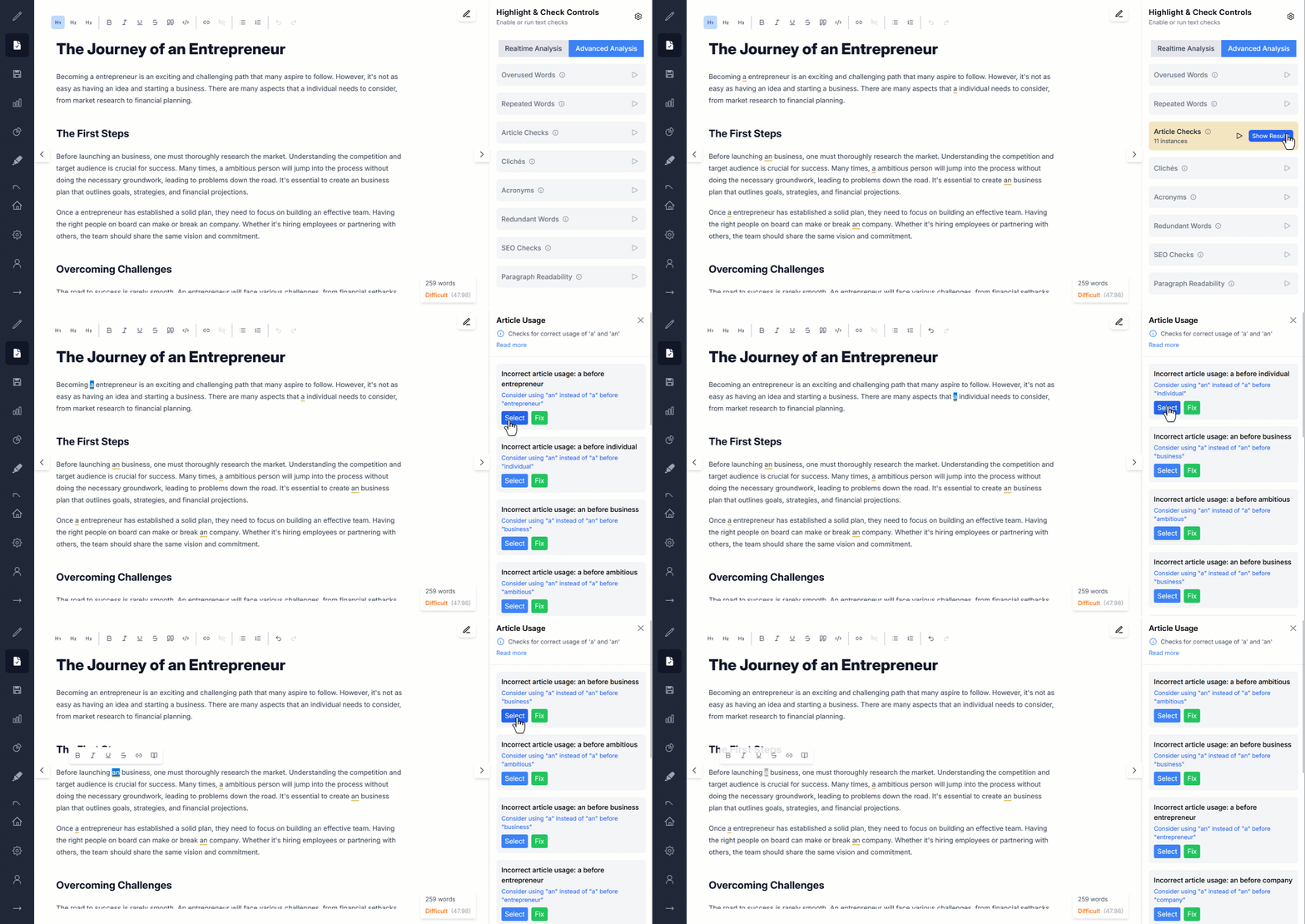
Open the Advanced Analysis tab in the Highlight & Check Controls panel and press play next to Article Checks.
- 2
Spot the slips
Every "a" or "an" that doesn't fit the next word is underlined, and the panel shows how many instances it found.
- 3
Select or fix
Click Show Results to see each issue. Press Select to find it in your text, or Fix to swap in the right article.
What you get
Small words, checked carefully
Spell checkers see two correctly spelled words. Gorby checks whether they belong together.
Checks every a and an
Gorby looks at each "a" and "an" in your text along with the word that comes right after it.
Goes by sound, not spelling
What matters is how the next word starts when you say it out loud, so "an hour" and "a university" are both right.
Underlined in your text
Wrong articles are underlined where they are, so a one-letter slip stands out in a long draft.
Every issue explained
Each result says what is wrong and what to use instead, like "Consider using an instead of a before entrepreneur".
Select to jump there
Select highlights the article in your text, so you can fix it by hand or rework the sentence.
Fix in one click
Fix swaps in the right article for you, and the issue drops off the list.
Make it yours
Make slips easy to spot
An article is one or two letters long, so its underline needs to stand out. Pick a color that's easy for you to see next to your other highlights.
- Underline color for incorrect articles
- Underline thickness, shared by all text checks
Settings
Changes are saved automatically.
Article Checks
Checks 'a' and 'an' usage
Highlight Color
We just hired a engineer with an MBA.
Click the color to see how a different underline looks.
A or an cheat sheet
Say the next word out loud and listen to how it starts.
- a before a consonant sound
- a book a year a university a European trip a one-time fee a URL
- an before a vowel sound
- an apple an idea an hour an honest answer an MBA an X-ray
Keep polishing
Pairs well with
Repeated Words Detection
Catches the same word typed twice in a row, like "the the", before a reader does.
Learn moreAcronyms Detection
Makes sure every acronym is spelled out the first time it appears.
Learn moreRedundant Words Detection
Spots phrases like "end result" that say the same thing twice.
Learn moreCliché Detection
Flags tired expressions that readers have seen too many times.
Learn more- What does Article Checks look for?
- Places where "a" or "an" doesn't match the word that follows it, like "a entrepreneur" or "an business". It only checks "a" and "an", not "the".
- When should I use "a" and when "an"?
- Use "a" before a word that starts with a consonant sound and "an" before a word that starts with a vowel sound. The sound matters, not the letter: it's "an hour" because the h is silent, and "a university" because it starts with a "you" sound.
- Does it handle words like "hour" and "university"?
- Yes. Gorby checks whether the next word starts with a vowel sound, not just a vowel letter, so correct uses like "an hour" and "a university" are left alone.
- What is the difference between Select and Fix?
- Select highlights the article in your text so you can fix it yourself, which is handy when you would rather reword the sentence. Fix replaces the article with the right one for you.
- Why do article mistakes happen so often?
- Mostly from editing. When you cut, add, or replace the word after an article, the article doesn't update with it, so "a big idea" becomes "a idea" the moment you delete "big".
- Is Article Checks included in the free plan?
- Article Checks is one of the Advanced Analysis checks, which come with every paid plan. The free plan includes real-time checks like hard-to-read sentences and passive voice.
- Does it work in the desktop app?
- Yes. Article Checks works the same way in the web app and the Gorby desktop app for Windows. With a plan, Pro checks stay unlocked for up to 5 days offline.
Small words, big first impression
Run Article Checks before you hit publish and let Gorby sweat the a's and an's.