Rewrite any sentence
in one click
Select your text and ask Gorby to rephrase it, simplify it, shorten it, or change its tone. The AI tools sit in the selection toolbar, the side panel, and right on flagged issues, so you never have to leave your draft.
Included in every paid plan · 1 credit per sentence · Web and Windows app
 Slow travel - Gorby
Zurich to Lugano, the slow way
Taking the train from Zurich to Lugano is, in many ways, an experience that offers travelers a considerably more relaxing alternative to the stress and hassle that is so often associated with flying. Once the Gotthard tunnel is behind you, palm trees start to replace the pine forests, and in the station cafés the hiss of espresso machines can be heard over the announcements. If you happen to have a free afternoon, it is honestly really worth staying a bit longer to walk along the lake.
Rewrite with AI
Rephrase, simplify, shorten or change the tone of the selected text.
1 credit per sentence · 19,986 credits left
…in the station cafés the hiss of espresso machines can be heard over the announcements.
Active voice is usually clearer and shorter.
No passive voice left.
The AI results in this demo are pre-written examples.
Try it: click any sentence and pick an action from the menu or the panel, or press Make active to fix the passive sentence.
Tone adjustments
Same message, seven tones
Who you write to changes how you should say it. A delay sounds different in a note to your team than in an update to a client. Pick a tone and Gorby rewrites your selection to match, without changing what it says.
Tone changes more than word choice. Switch between tones and watch the length and reading ease change with them, while the message stays the same.
- Words
- 22
- Reading ease Very Easy
- 96 Harder Easier
The seven tones
- Confident Direct and assertive, without hedging.
- Professional Formal and business-appropriate.
- Casual Relaxed and conversational.
- Friendly Warm and approachable.
- Technical Precise, with more technical detail.
- Diplomatic Tactful and considerate.
- Persuasive A stronger argument that still sounds like you.
How it works
From clunky to clear in three steps
- 1
Select your text
Highlight a phrase, a sentence, or a few paragraphs. Gorby rewrites up to 30 sentences at a time.
- 2
Pick an action
Click the wand in the selection toolbar, use Rewrite with AI in the side panel, or press Make active on a passive voice issue.
- 3
Keep what works
Read the new version and keep it, or try another action. The full assistant shows both versions side by side before you apply.
What you get
A second pair of hands for every draft
Keep your ideas and your voice. Let the AI handle the rewording, one selection at a time.
Rephrase
Get a fresh way to say the same thing when a sentence feels stale, clunky, or too close to the source.
Simplify
Swap long words and tangled sentences for plain ones. The full assistant shows your reading ease score before and after.
Shorten
Cut filler and repetition while keeping the point, for tight emails, intros, and summaries.
Seven tones
Switch between Professional, Casual, Friendly, and four more, so one message fits a client, a colleague, or a crowd.
Fixes for flagged issues
Press Make active on a passive voice issue to rewrite it on the spot. The full assistant also strengthens weak adverb-verb pairs.
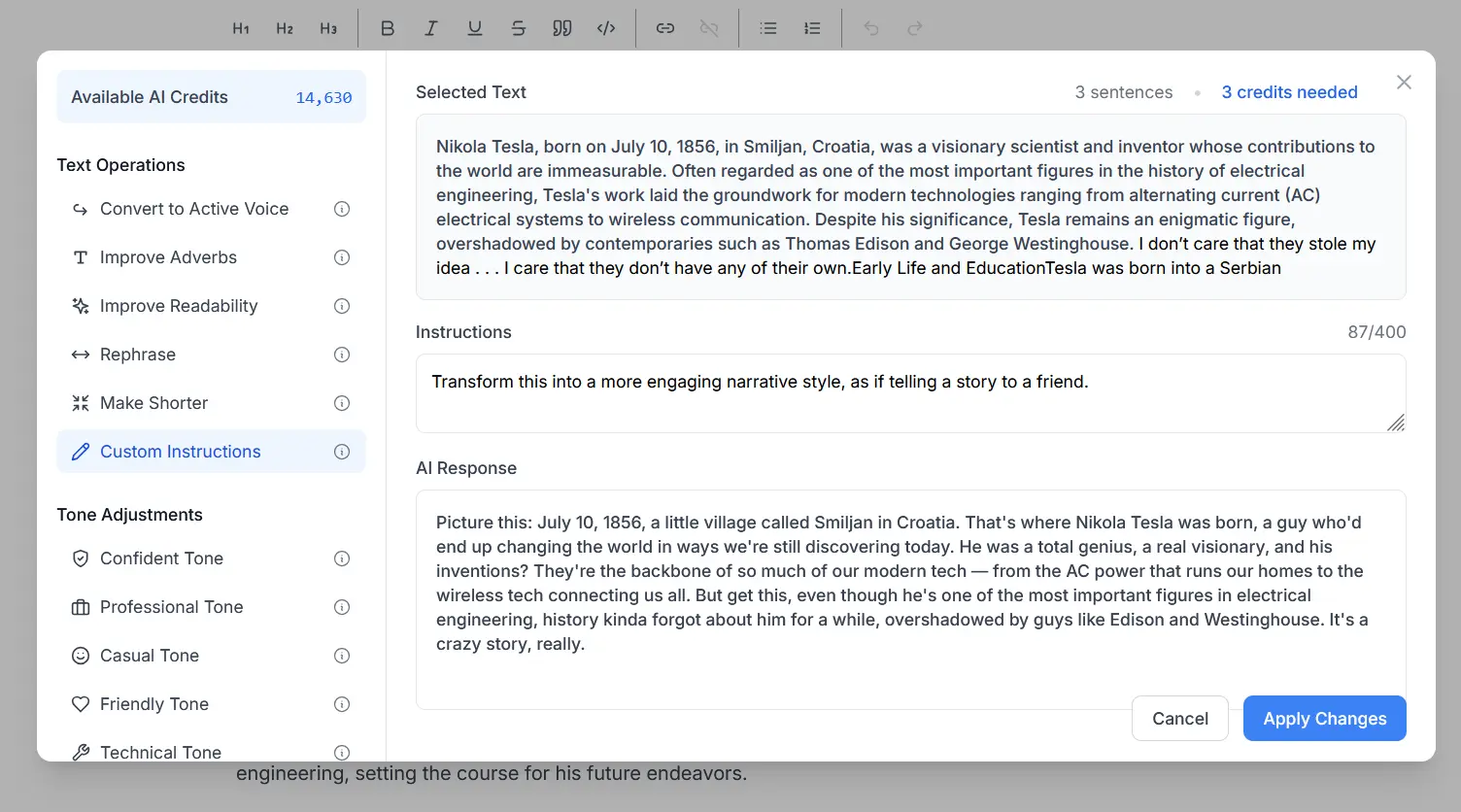
Your own instructions
Describe the change you want in your own words, like "turn this into a story for a friend", in up to 400 characters.
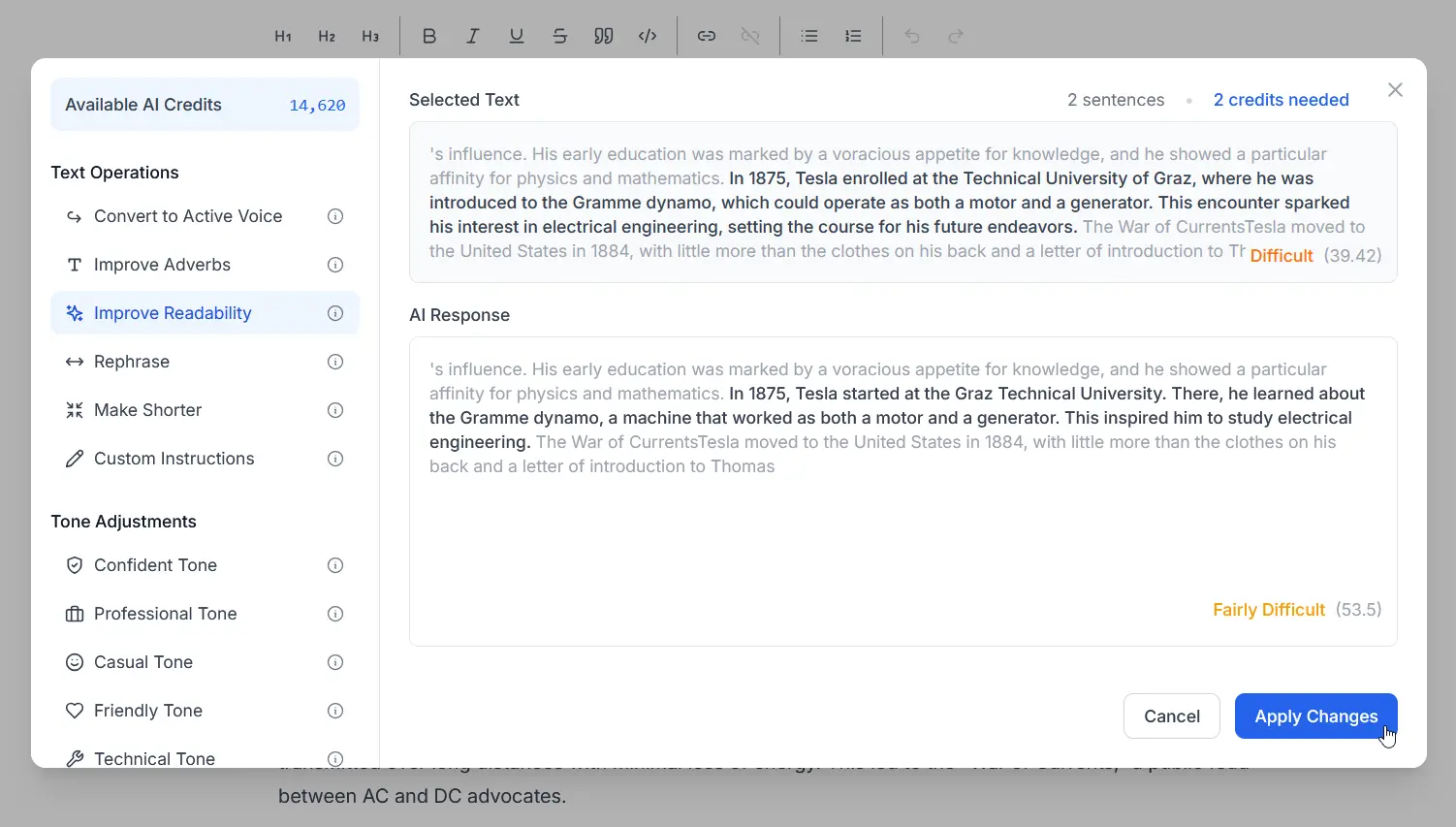
The full assistant
Want more control?
Click More… in the AI menu to open the full assistant. It has every operation, room for your own instructions, and a record of what you have changed.
- Every operation in one place, including Convert to Active Voice and Improve Adverbs
- Custom instructions, up to 400 characters
- Your text and the AI response side by side before you apply
- Reading ease before and after when you improve readability
- A history of your last 50 operations, stored on your device
How AI credits work
Simple math: one sentence, one credit, whichever action you pick.
- 1 Per sentence
- Every action costs one credit per sentence you select. A 5-sentence paragraph uses 5.
- 20,000 Yearly
- Credits included every year with the Yearly plan.
- 35,000 Lifetime
- Credits included with a Lifetime license.
- 10,000 Top up
- More credits for $5 USD, whenever you need them, right from the app.
Keep polishing
Pairs well with
Text Checks and Highlights
Flags hard-to-read sentences, passive voice, and adverbs in real time as you write.
Learn moreReadability Metrics
Scores your whole text with formulas like Flesch-Kincaid, Coleman-Liau, and Dale-Chall.
Learn moreParagraph Readability
Scores each paragraph so you can see exactly which ones are hard to read.
Learn moreRedundant Words Detection
Spots phrases like "end result" that say the same thing twice.
Learn moreFAQ
Common questions
Want to compare plans and credits side by side? See plans and pricing. Still have a question? Email us at contact@gorby.app.
- What can Gorby's AI Writing Assistant do?
- It rewrites the text you select. You can rephrase it, simplify it, shorten it, switch it to active voice, strengthen weak adverbs, change it to one of seven tones, or give it your own instructions.
- Where do I find the AI tools in the editor?
- Select some text and click the wand in the selection toolbar for Rephrase, Simplify, Shorten, and Change tone. The same actions are in the Rewrite with AI card in the side panel. Passive voice issues have a Make active button, and More… in the AI menu opens the full assistant with every option.
- How do AI credits work?
- Each action uses one credit per sentence in your selection, whichever action you pick. Rewriting a five-sentence paragraph uses five credits. Gorby shows the cost before you run an action and keeps your remaining credits in view.
- How many credits do I get?
- The Yearly plan includes 20,000 AI credits a year, and a Lifetime license includes 35,000. If you run low, you can buy 10,000 more for $5 USD right from the app.
- What happens when I run out of credits?
- Everything else in Gorby keeps working, from readability scores to the sentence highlighter. Only the AI tools pause until your plan refreshes or you top up.
- How much text can I rewrite at once?
- Up to 30 sentences per request. For longer pieces, work through them a section at a time, which also makes the changes easier to review.
- Will the AI keep my formatting?
- The AI returns plain text, so formatting like bold, italics, or links inside the selection needs to be added back after a rewrite.
- Where is my AI history stored?
- On your device. The full assistant keeps your last 50 operations, with the original text, the AI response, and any custom instructions, so you can look back at what changed.
- Is the AI Writing Assistant included in the free plan?
- AI credits come with every paid plan. The free plan includes real-time checks like hard-to-read sentences and passive voice.
- Does it work in the desktop app?
- Yes. The AI tools work the same way in the web app and the Gorby desktop app for Windows. They need an internet connection, since the rewriting happens online.
Find the right words faster
Rephrase, shorten, or change the tone of any sentence in your next draft.