9 ProWritingAid alternativesand who each one fits

Tools like ProWritingAid for revising a book, dissertation, or long article, whether you’re leaving it or still deciding. Most do one of its jobs in more depth. We make Gorby, one of the nine, so we say where another tool fits better.

Checked November 2026 Regular prices, not sale prices Facts from each tool’s own site

First, the baseline

What ProWritingAid is

A grammar checker grown into a manuscript toolkit, with 25+ reports, from pacing and dialogue tags to sticky sentences, and checks inside Word, Scrivener, and Google Docs.

reports on style, pacing, and dialogue
25+
a year for Premium, or $399 for lifetime
$120
for each whole-book critique, on top of any plan
$25–$50

Stay with it if

  • You want your writing checked inside Word, Scrivener, or Google Docs
  • You’ll use its reports on pacing and dialogue, and its AI critiques of the story
  • You want grammar, style, and story feedback from one tool

Look at an alternative if

  • You use a few of its reports and pay for all of them every year
  • You want one job done in more depth: sentence rhythm, story structure, or grammar in another language
  • You’d rather your manuscript was checked on your own computer
  • You haven’t bought anything yet and want to see what else there is

Part 1 · Sentences and paragraphs

Tools for style and readability

These work on the prose itself: what to cut, what to shorten, and where a chapter reads hard. It’s the layer most of ProWritingAid’s reports cover.

Gorby That’s us

Self-editing app for writers

Pick it for Sentence rhythm, paid once

Gorby is a separate place for the sentence-level pass of a revision. It colors every sentence by its length, scores the reading ease of every paragraph, and flags the words you could cut. Every license is a one-time payment.

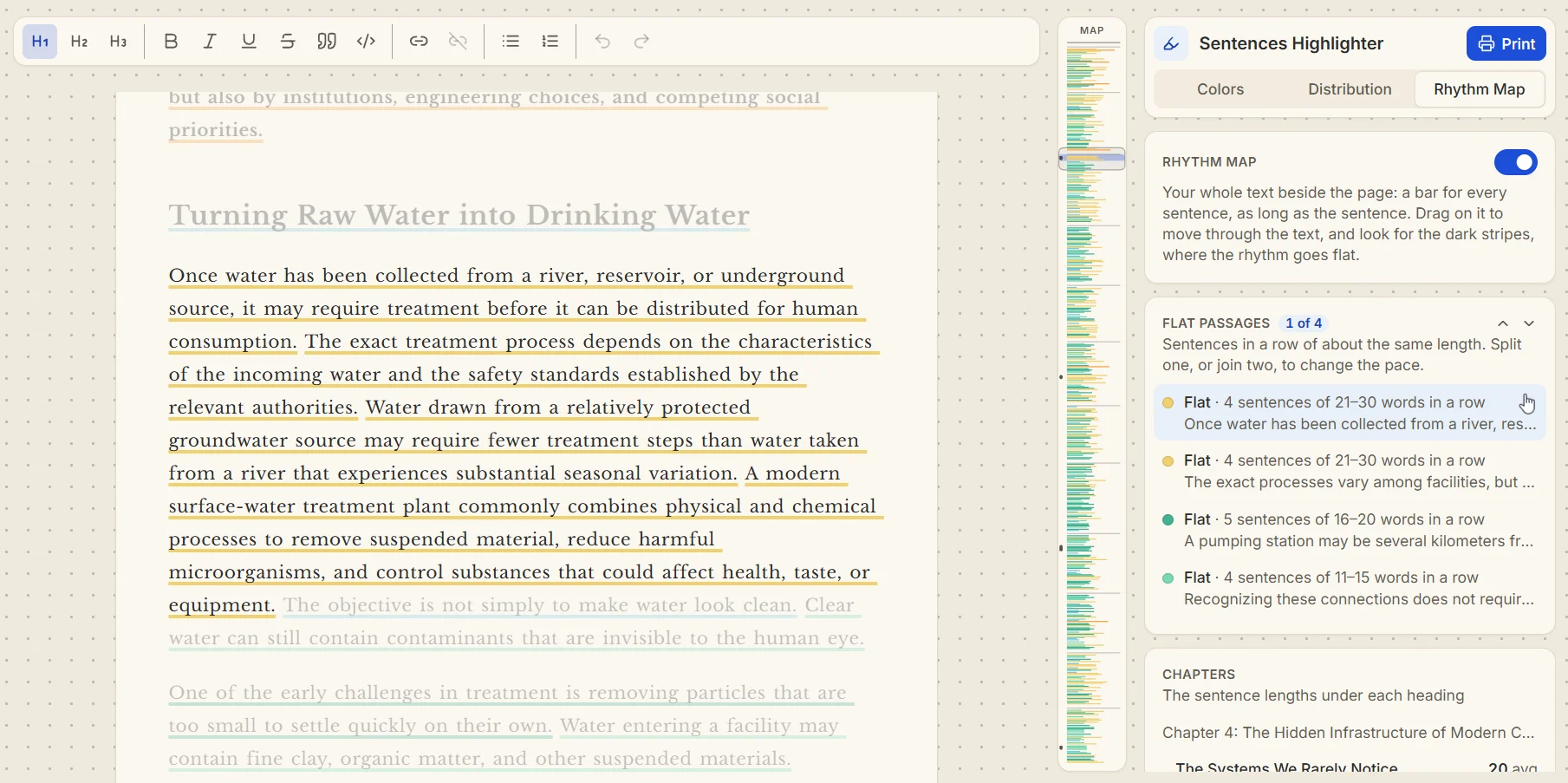
Gorby’s Sentences Highlighter on a chapter about drinking water, with sentences underlined in the color of their length and the Rhythm Map beside the text. The Rhythm Map tab lists four flat passages. The first passage is picked, so its sentences stay lit while the rest of the text dims.
Gorby’s Sentence Highlighter on a nonfiction chapter: every sentence in the color of its length, and the flat passages listed beside the text.
Regular price
$15 for a month, $75 for a year, or $150 for Lifetime
How you pay
Once. No license renews automatically
Free version
Yes, in your browser, with no account
Where it runs
Web, Windows, and Mac

Where it’s strong

  • Sentence rhythm. Every sentence is colored by its length, using ranges you set, and the flat passages are listed. ProWritingAid gives a graph and a variety score.
  • Readability. A reading ease score beside every paragraph and 8 formulas, to ProWritingAid’s three difficulty levels and 4 formulas.
  • Privacy. Your manuscript is analyzed on your device. Only the text you select for an AI edit leaves it.
  • AI that stays small. It works on the text you select, up to 30 sentences at a time, and shows its version before anything changes.
  • Price. A Lifetime license is $150, with 100,000 AI credits and a 14-day money-back guarantee. ProWritingAid’s lifetime option starts at $399.

Where it stops

  • No reports on plot, characters, dialogue, or story pacing.
  • No add-in for Word or Google Docs and no browser extension yet. A browser extension and a Word add-in are planned.
  • Spelling and grammar checks are in the desktop app only.
  • No checks made for fiction, such as dialogue tags.

Next to ProWritingAid: Pick Gorby if your feedback is about rhythm and density and you’d rather pay once. Stay with ProWritingAid if you need checks inside Word or Scrivener, or reports on the story.

Gorby vs ProWritingAid, round by round

AutoCrit

Editing reports for fiction

Pick it for Reports made for fiction

AutoCrit is the closest in kind to ProWritingAid. It’s a web-based manuscript editor with 25+ editing tools, reports on pacing and dialogue, and comparisons of your style with select genres.

Regular price
Free plan. Pro is $30 a month or $180 a year
How you pay
A subscription that renews automatically
Free version
Yes, Free Forever, with some of the editing tools
Where it runs
In your web browser

Where it’s strong

  • 25+ interactive editing tools on Pro, with reports that include Pacing, Dialogue, and Strong Writing.
  • A Summary Report with an AutoCrit Score, and comparisons of your style with select genres.
  • Story Analyzer+ looks at character arcs, conflict, and plot threads. Pro also includes automated alpha and beta readers.
  • The Free Forever plan has no word limit and includes the Adverbs, Word Choice, and Readability tools.
  • A spelling and grammar checker on Pro, run as a report.

Where it stops

  • It’s web-based software, so you work on the manuscript in your browser, not inside Word or Scrivener.
  • Its pricing page lists no lifetime option. Pro renews every month or year until you cancel.
  • No refunds on monthly plans. A yearly plan can be refunded within 60 days, less $30 for each month used.
  • The grammar check doesn’t run as you type.

Next to ProWritingAid: Both are built on reports. AutoCrit leans further into fiction, with genre comparisons and story analysis in Pro. ProWritingAid works inside Word, Scrivener, and Google Docs, and sells a lifetime license.

Hemingway Editor

Readability editor

Pick it for A quick readability pass

Hemingway Editor is the simplest tool on this page. Paste a draft, get one grade level, and see hard sentences, adverbs, passive voice, and qualifiers highlighted.

Regular price
Free web editor. Plus is $25 a month or $100 a year
How you pay
A subscription. The $19.99 desktop app is paid once, without AI
Free version
Yes, the web editor
Where it runs
Web, Windows, and Mac

Where it’s strong

  • One screen and one grade level, with nothing to set up.
  • Highlights hard sentences, adverbs, passive voice, and qualifiers.
  • The desktop app is a one-time $19.99, with the free editor’s checks and no AI. Its checks run on your device.
  • Plus adds grammar fixes and AI rewrites.

Where it stops

  • One grade level for the whole text, with no score for each paragraph.
  • No checks for overused words, clichés, or redundant phrases.
  • Grammar fixes and AI need the Plus subscription.

Next to ProWritingAid: Hemingway does a small part of what ProWritingAid does, with less to learn. For a blog post or a cover letter, that may be all you need. For a manuscript, it shows you less.

Readable

Readability scoring for teams

Pick it for Readability for a team

Readable is a readability platform more than a manuscript editor. It scores drafts, web pages, uploaded files, and emails with 16 formulas, and has plans for teams.

Regular price
Plans from $48 a year
How you pay
A subscription
Free version
A 7-day free trial
Where it runs
Web, with Slack, Dropbox, and API connections

Where it’s strong

  • 16 readability formulas, the most of any tool here.
  • Scores web pages, uploaded files, and emails as well as pasted text.
  • Plans for teams of 3 or 5.
  • Also flags long sentences, passive voice, adverbs, and clichés.
  • Uses no AI, by design.

Where it stops

  • No desktop app.
  • No AI editing and no story reports.
  • No one-time price.

Next to ProWritingAid: Readable goes deeper on one of ProWritingAid’s reports, readability, and adds team plans and website scoring. It suits a content team more than a novelist.

SmartEdit Writer

Free novel-writing app for Windows

Pick it for Free checks on Windows

SmartEdit Writer is a free Windows app for planning and writing a novel scene by scene. Its built-in editor runs a set of checks and lists what it finds. It doesn’t suggest rewrites.

Regular price
Free
How you pay
There’s nothing to pay
Free version
The whole app is free
Where it runs
Windows only

Where it’s strong

  • Lists repeated words and phrases, adverbs, clichés, redundancies, and misused words.
  • Lists every dialogue tag, proper noun, and acronym, so inconsistencies stand out.
  • Shows your extra-long sentences and the words you start sentences with.
  • Imports Word documents and exports the finished novel to Word.
  • It points things out and leaves every change to you.

Where it stops

  • Windows only. Its site says there is no Mac version.
  • Its latest version, 9, is from April 2021.
  • The paid Word add-ins, SmartEdit for Word and SmartEdit Pro, were withdrawn from sale in November 2024.

Next to ProWritingAid: It covers the list-style reports, such as repeats, adverbs, clichés, and dialogue tags, at no cost. ProWritingAid runs on more than Windows and works inside Word and Scrivener. SmartEdit Writer’s last release was in April 2021.

Part 2 · The story

Tools that read for story

ProWritingAid’s Chapter Critique and Manuscript Analysis give AI feedback on the story. These two tools work only on the story.

Fictionary

Story editing for novelists

Pick it for A scene-by-scene story edit

Fictionary StoryTeller is for the edit that comes before the sentences: does the story work? You evaluate every scene against 38 story elements, and it draws the story arc.

Regular price
StoryTeller $19 a month or $168 a year. Premium $39 a month or $348 a year
How you pay
A subscription
Free version
A 7-day free trial, no credit card
Where it runs
In a web browser, on a laptop or desktop

Where it’s strong

  • 38 story elements to evaluate, scene by scene.
  • 15 visualizations of the manuscript, including an automated Story Arc.
  • AI feedback on each scene.
  • Imports and exports Word .docx files.
  • Its FAQ says the ProWritingAid and Grammarly browser extensions work inside its web app.

Where it stops

  • For fiction: its site describes it as for writers with a finished draft of a novel.
  • No grammar or sentence-level checks of its own. Its FAQ says to work on word choice, style, and grammar afterward.
  • You do the evaluating, one scene at a time.

Next to ProWritingAid: ProWritingAid mostly checks sentences and adds AI critiques of the story. Fictionary works only on the story and leaves the sentences to another tool, which could be ProWritingAid.

Marlowe

AI manuscript report, from Authors A.I.

Pick it for A report on the whole novel

Marlowe, from Authors A.I., reads a whole novel and returns a report within minutes: plot and narrative arc, pacing, characters, and style. It reports on the manuscript and never rewrites it.

Regular price
Basic report free. Pro report $29.95, or $19.95 a month for 4 reports
How you pay
Per report, or by subscription
Free version
Yes, the Basic report
Where it runs
On the web: you upload a .docx or ePub file

Where it’s strong

  • The Pro report covers plot and narrative arc, pacing, story elements, characters, conflict, theme, and author voice.
  • It also reports on readability, clichés, repetitive phrases, and the balance of dialogue.
  • You can buy one report for $29.95, with no subscription. A year of 48 reports is $159.
  • Authors A.I. says it never uses manuscripts for training.

Where it stops

  • Built for fiction. Its FAQ says its expertise is primarily with fiction.
  • It’s a report, not an editor: you make the changes somewhere else.
  • No refunds, according to its terms.
  • On a subscription, unused reports don’t roll over.

Next to ProWritingAid: It’s the nearest thing here to ProWritingAid’s Manuscript Analysis, which costs a Story Credit of $25–$50 on top of your plan. One Marlowe Pro report is $29.95 and needs no plan.

Part 3 · Grammar and spelling

Tools for grammar everywhere you type

If the grammar checker is the part of ProWritingAid you use every day, these two cover it in more places or more languages.

Grammarly

Grammar checker and AI assistant

Pick it for Grammar everywhere you type

Grammarly is the best-known grammar checker. It follows you into email, Word, Google Docs, and your phone’s keyboard.

Regular price
Free plan. Pro is $144 a year or $30 a month
How you pay
A subscription
Free version
Yes, with 100 AI prompts a month
Where it runs
Browser, Word, Google Docs, Windows, Mac, and phones

Where it’s strong

  • Grammar and spelling wherever you type, phone included.
  • Works inside Word and Google Docs.
  • 100 AI prompts a month on the free plan and 2,000 on Pro.
  • Clarity tips flag hard sentences and passive voice.

Where it stops

  • No view of your sentence lengths, and no reading level for each paragraph.
  • One readability score.
  • No story reports.
  • No one-time price.

Next to ProWritingAid: Both check grammar inside Word and Google Docs. ProWritingAid adds Scrivener and its manuscript reports. Grammarly adds a keyboard for your phone.

LanguageTool

Grammar checker for 30+ languages

Pick it for Grammar in 30+ languages

LanguageTool is a grammar, punctuation, and style checker for more than 30 languages and dialects. Its core is open source, and you can run your own server.

Regular price
Free plan. Premium is €60.90 a year or €20.23 a month in the EU, tax included
How you pay
A subscription that renews automatically
Free version
Yes, with basic checks
Where it runs
Browsers, Word, Google Docs, Windows, and Mac

Where it’s strong

  • More than 30 languages and dialects.
  • Add-ons for Chrome, Edge, Firefox, Opera, and Safari, a Word add-in, and desktop apps for Windows and Mac.
  • Premium checks texts of up to 150,000 characters and includes unlimited AI paraphrasing of sentences.
  • An open-source core. Its site says anyone can set up their own LanguageTool server.
  • A 14-day money-back guarantee on Premium.

Where it stops

  • It’s a grammar and style checker. Its pages describe no reports on a manuscript or a story.
  • Premium is sold by the month, quarter, year, or two years, with no one-time price listed.
  • Its pricing page shows prices in your own currency, so yours may differ from the euro prices here.

Next to ProWritingAid: LanguageTool can replace ProWritingAid’s grammar checking, and does it in more languages. It doesn’t replace the reports.

Side by side

All ten in one table

ProWritingAid and its nine alternatives: what each is best for, what it costs at regular prices, and whether you can pay once.

ProWritingAid compared with Gorby, AutoCrit, Hemingway Editor, Readable, SmartEdit Writer, Fictionary, Marlowe, Grammarly, and LanguageTool
ToolBest forRegular pricePay onceFree versionWhere it runs
ProWritingAid The baselineReports and checks inside Word or ScrivenerFree plan, or Premium $120 a yearYes Lifetime from $399 Partly 500 words at a timeWeb, Word, Scrivener, Docs, desktop
Gorby That’s usSentence rhythm and paragraph readability$15, $75, or $150Yes Every licenseYes No account neededWeb, Windows, Mac
AutoCritFiction reports and genre comparisons$30 a month or $180 a yearNoYes Free Forever planWeb
Hemingway EditorA quick pass on a short pieceFree, or Plus $25 a month or $100 a year Partly Desktop app, no AIYes Web editorWeb, Windows, Mac
ReadableReadability for teams and websitesFrom $48 a yearNo Partly 7-day trialWeb
SmartEdit WriterFree editing checks on WindowsFreeYes FreeYes The whole appWindows
FictionaryA structural edit of a novelFrom $19 a month or $168 a yearNo Partly 7-day trialWeb
MarloweA report on a whole novelFree, or $29.95 a reportYes Per reportYes Basic reportWeb
GrammarlyGrammar everywhere you typeFree, or Pro $144 a yearNoYes Free planBrowser, Word, Docs, desktop, phone
LanguageToolGrammar in many languagesFree, or Premium €60.90 a yearNoYes Basic checksBrowser, Word, Docs, desktop

Prices are regular prices, not sale prices, in US dollars except LanguageTool’s. Checked in November 2026 against each tool’s own website and help pages. Tools change often, so if something here is out of date, email contact@gorby.app and we’ll fix it. For a feature-by-feature view of five of these tools, see the table on our comparison page.

Black Friday: check the current prices

The prices on this page are regular prices, and several of these tools run sales around Black Friday. Until December 15, Gorby’s 1-year and Lifetime licenses are 30% off with code GORBYBF26: $52.50 and $105, still paid once.

See Gorby’s Black Friday deal Read the writing software deals roundup

The other alternative

What about ChatGPT or Claude?

A general AI chatbot is the alternative many writers try first. It’s good at some of this work, and a revision tool is better at the rest.

What a chatbot is good for

  • Talking a chapter through: what’s unclear, what a scene is doing, how else a sentence could go.
  • Rewriting whatever you paste, in any style you ask for.
  • Explaining a grammar rule, with examples from your own text.

What a revision tool does better

  • It checks the whole text the same way every time. A chatbot answers the question you asked, about the part you pasted.
  • It counts. Sentence lengths, readability scores, and repeated words are calculated, where a chatbot may estimate.
  • It leaves your words alone until you change them. Ask a chatbot to fix a paragraph and you get a new paragraph back.

Publishing on Amazon KDP?

KDP counts AI you use to “edit, refine, error-check, or otherwise improve” your own writing as AI-assisted, which it doesn’t ask you to disclose. Text an AI wrote for you is AI-generated, which it does. Read KDP’s content guidelines. Gorby’s AI stays on the editing side: it works only on the sentences you select, up to 30 at a time, and shows its version beside yours. Publishers and journals set their own rules, so check yours.

FAQ

Common questions

Choosing between two tools? Read Gorby vs ProWritingAid or see all comparisons. Still have a question? Email us at contact@gorby.app.

What is the best ProWritingAid alternative?
It depends on which part of ProWritingAid you’d miss. For sentence rhythm and paragraph readability with a one-time payment, Gorby. For reports made for fiction, AutoCrit. For feedback on the story, Fictionary or Marlowe. For grammar everywhere you type, Grammarly, or LanguageTool for languages other than English. For a quick readability check of a short piece, Hemingway Editor. No single tool replaces all of ProWritingAid, and most of these are meant to do one of its jobs in more depth.
Is there a free ProWritingAid alternative?
Several have a free version. Gorby is free in your browser with no account: the Write view, five real-time checks, Flesch reading ease and grade level, read-aloud, and printing. Hemingway Editor’s web editor is free. AutoCrit has a Free Forever plan with some of its editing tools. Grammarly and LanguageTool have free plans for grammar. Marlowe’s Basic report is free. SmartEdit Writer is free altogether, on Windows only. ProWritingAid’s own free plan checks 500 words at a time.
Is there a ProWritingAid alternative without a subscription?
Yes. Every Gorby license is a one-time payment that doesn’t renew: $15 for a month, $75 for a year, or $150 for Lifetime. Hemingway Editor’s desktop app is a one-time $19.99, without the AI features of its Plus subscription. Marlowe sells a single Pro report for $29.95. SmartEdit Writer is free. ProWritingAid sells lifetime licenses too, from $399. AutoCrit, Fictionary, Grammarly, LanguageTool, and Readable are subscriptions.
Which ProWritingAid alternative is best for fiction?
AutoCrit is the closest in kind: reports that include Pacing and Dialogue, genre comparisons, and story analysis, for $30 a month or $180 a year. Fictionary StoryTeller is a structural edit, scene by scene, against 38 story elements. Marlowe reads the whole novel and returns a report for $29.95. For the sentence level of a novel, Gorby shows the rhythm of every sentence and the words you could cut.
Which one is best for a dissertation or a journal paper?
Gorby fits most academic revision: a reading ease score beside every paragraph for the “too dense” note, 8 readability formulas, and AI that only touches the sentences you select. If you write in Word with tracked changes from co-authors or a supervisor, a checker that works inside Word fits better: ProWritingAid, Grammarly, or LanguageTool. Fictionary and Marlowe are made for fiction. Check your journal’s or university’s AI policy before you use AI on the text.
Which alternatives work inside Word or Google Docs?
Grammarly and LanguageTool both do. Grammarly works inside Word and Google Docs, and LanguageTool has a Word add-in and checks Google Docs through its browser add-on. Gorby doesn’t yet: you paste a chapter in, or open a .docx file in the desktop app, and export to Word when you’re done. A Word add-in for Gorby is planned. AutoCrit, Fictionary, Marlowe, and Readable run in the browser, and you bring your text to them. If checks inside Word or Scrivener are what you need most, ProWritingAid is still a good fit.
Which alternative keeps my manuscript on my own computer?
Gorby analyzes your manuscript on your device: the checks, scores, and highlights run in your browser or in the desktop app, and only the text you select for an AI edit is sent out. Hemingway Editor’s checks run on your device too, apart from its Plus features. LanguageTool’s core is open source, and its site says anyone can set up their own server. ProWritingAid sends your text, encrypted, to its servers to be checked, and says the text is removed once it has been processed.
Can I use ChatGPT or Claude instead of ProWritingAid?
For talking through a chapter or rewriting a sentence, yes. For a revision pass, a dedicated tool does three things a chatbot doesn’t do reliably: it checks the whole text the same way every time, it calculates sentence lengths and readability scores, where a chatbot may estimate, and it leaves your words alone until you change them. If you publish on Amazon KDP, text an AI wrote for you counts as AI-generated, which KDP asks you to disclose. Using AI to edit your own writing counts as AI-assisted, which it doesn’t.
Is Gorby a good ProWritingAid alternative?
For the sentence-level part of a revision, yes. Gorby colors every sentence by its length, shows the reading ease of every paragraph, flags filler, clichés, and redundant phrases, and checks spelling and grammar in its desktop app. It doesn’t replace ProWritingAid’s story reports or its integrations with Word, Scrivener, and Google Docs. Every Gorby license is a one-time payment: $15 for a month, $75 for a year, or $150 for Lifetime.
Is ProWritingAid still worth buying?
For many writers, yes. It checks your writing inside Word, Scrivener, and Google Docs, has 25+ reports, and gives AI feedback on a chapter or a whole manuscript. Premium is $120 a year or $399 once for lifetime, at regular prices. It’s the right purchase if you’ll use the integrations and a good share of the reports. If you mostly want one thing from it, one of the tools on this page may do that thing better or for less.
Can I use more than one of these tools?
Yes. The tools work on different layers, so they stack. A sensible order is story first, with Fictionary or Marlowe; then sentences, with Gorby or AutoCrit; then a last grammar check, with Grammarly, LanguageTool, or ProWritingAid. Gorby’s desktop app opens .docx files and exports back to Word, so a chapter can move between tools.
Where do these facts come from?
Prices and features come from each tool’s own website and help pages, checked in November 2026, at regular prices, not sale prices. LanguageTool shows prices in the visitor’s currency, so we give its regular euro prices. When we couldn’t confirm something on a tool’s own site, we left it out. We make Gorby, so its side describes the app as it is today. Tools change often: if something here is out of date, email contact@gorby.app and we’ll fix it.

Open a chapter. See what to fix.

Try Gorby free in your browser, no account needed. When you’re ready for the Sentence Highlighter, every readability score, and the advanced checks, pick a license.