Gorby vs ProWritingAid

Gorby vs ProWritingAidfor revising a manuscript

Both help you revise a book, dissertation, or long article before an editor sees it. ProWritingAid is a grammar checker with 25+ reports that works inside Word and Scrivener. Gorby is a separate place for the sentence-level pass, with licenses you pay for once. We make Gorby. Of the nine rounds below, it goes further in four, ProWritingAid in four, and one depends on how you work.

Checked November 2026 Regular prices, not sale prices Says where each one goes further

The short answer

Pick Gorby if

  • Your feedback says the prose drags or runs dense, and you need to see which sentences cause it
  • You want AI to fix a sentence, never to write or rewrite a chapter
  • You revise in a dedicated pass, one chapter at a time
  • You’d rather pay once than subscribe

Pick ProWritingAid if

  • You want your writing checked inside Word, Scrivener, or Google Docs
  • You want reports on pacing and dialogue, or an AI critique of the whole manuscript
  • Grammar and spelling are your first worry, everywhere you write
  • You’ll use enough of its 25+ reports to make a yearly subscription worth it

Not sure? You don’t have to choose. See how to use both →

Round by round

Where each one goes further

Nine questions a writer asks during a revision, and which tool does more about each. Pick a round to read the details.

Part 1 · Revising the manuscript

Finding what to fix

Four questions from a revision pass, from the length of a single sentence up to the story as a whole.

Sentence rhythm

Where does the prose go flat?

Gorby goes further

“The middle drags” is often a note about rhythm: a page of sentences that all run to the same length. To fix it, you first have to see how long your sentences are, in order, across the chapter.

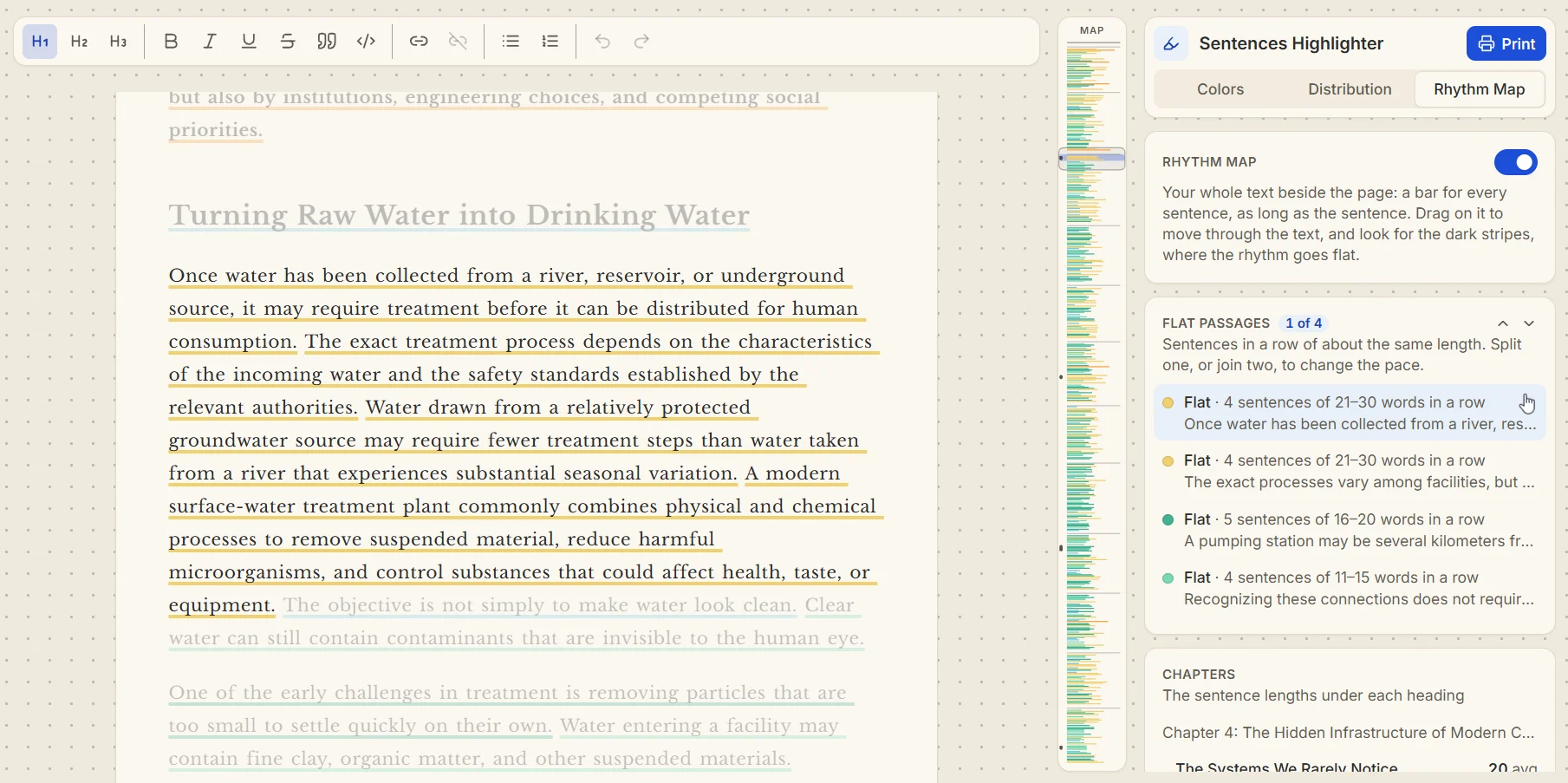
Gorby’s Sentences Highlighter on a chapter about drinking water, with sentences underlined in the color of their length and the Rhythm Map beside the text. The Rhythm Map tab lists four flat passages: two runs of 21–30-word sentences, one of 16–20, and one of 11–15. The first passage is picked, so its sentences stay lit while the rest of the text dims. A Chapters list sits below.
Gorby’s Rhythm Map on a nonfiction chapter. The first of four flat passages is picked, so the rest of the text dims.

Gorby

  • The Sentence Highlighter colors every sentence by its length, using ranges you set.
  • The Rhythm Map beside your text draws a bar for every sentence, so a whole chapter’s rhythm shows in one strip.
  • It lists the flat passages: four or more short sentences in a row, four or more from one middle range, or three or more of your longest.
  • Click a sentence to split it, tighten it, or combine it with the next one using AI. You see the result before anything changes.
About the Sentence Highlighter

ProWritingAid

  • The Sentence Length report graphs the length of every sentence and gives a variety score, your average length, and a count of long sentences.
  • The Sentence Structure report compares how your sentences start with other writing in your genre.
  • The Pacing report looks at something else: slow paragraphs of introspection and backstory, so you can spread them out.

Bottom line: For sentence rhythm, Gorby shows more in the text itself: every sentence colored where it stands, and the flat passages listed for you. ProWritingAid gives you a graph and a variety score. Its Pacing report answers a different question, covered in round 4.

Readability

Which paragraphs read hardest?

Gorby goes further

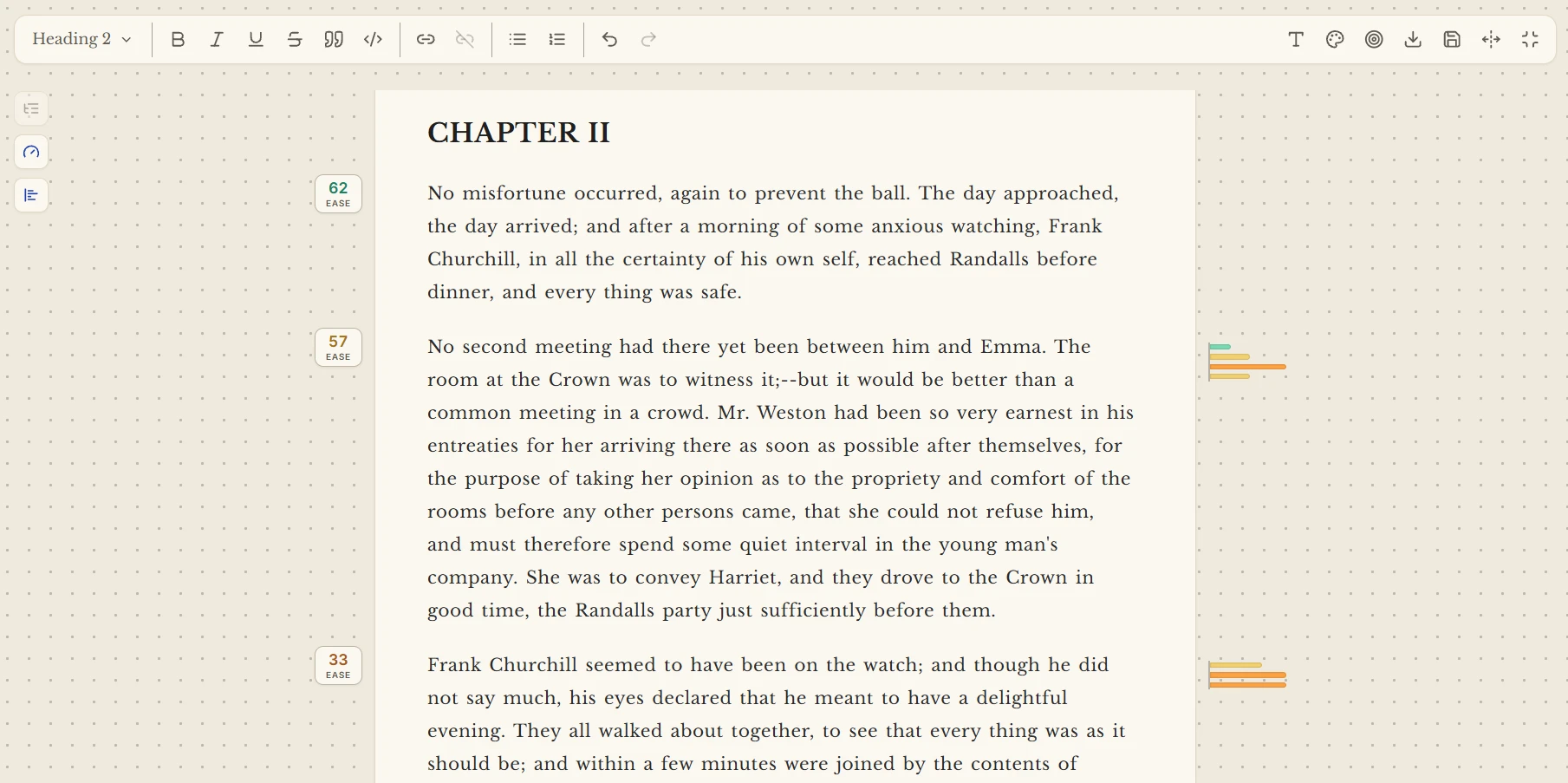
“Too dense” comes without page numbers. One score for the whole chapter won’t tell you where to simplify. A score for each paragraph will.

Gorby’s Write view on a chapter of Jane Austen’s Emma. Reading ease scores of 62, 57, and 33 sit in the left margin beside the first three paragraphs, so the third stands out as the hardest to read. Small bars on the right show the sentence lengths in each paragraph.
Reading ease beside each paragraph, on a chapter of Jane Austen’s Emma. The paragraph at 33 reads hardest, so it’s the first to look at.

Gorby

  • A Flesch Reading Ease score sits in the margin next to every paragraph of 30 words or more.
  • Eight formulas score the whole text, each with a chart: Flesch Reading Ease, Flesch-Kincaid, Gunning Fog, SMOG, Coleman-Liau, ARI, Dale-Chall, and Spache.
  • The hard words behind a score are listed, so you know what to change.
  • One score shows by default. The other seven are a click away.
About paragraph readability

ProWritingAid

  • The Readability report gives four scores: Flesch Reading Ease, Flesch-Kincaid Grade, Coleman-Liau, Automated Readability Index, plus an estimated reading time.
  • It underlines paragraphs as easy, slightly difficult, or very difficult to read.
  • On the free plan, each report runs 2 times a day, on up to 500 words.

Bottom line: Both will find your dense paragraphs. Gorby puts a number beside each one and has eight formulas to ProWritingAid’s 4, which matters when a journal, a funder, or a style guide names a specific one.

Style checks

What else can it catch?

ProWritingAid goes further

After the tenth read-through, “it goes without saying” and “first and foremost” turn invisible. Both tools mark what you’ve stopped seeing. They differ in how many kinds of things they look for.

Gorby

  • Free, as you type: hard-to-read sentences, passive voice, adverbs, qualifiers like “very” and “just”, and words with simpler alternatives.
  • With a license: clichés, redundant phrases, overused words, doubled words like “the the”, and unexplained acronyms.
  • The marks sit in your text, grouped by type in one Review panel. You decide what goes.
  • No checks made for fiction, such as dialogue tags or sensory words.
About the text checks

ProWritingAid

  • 25+ reports, each looking at one thing: overused words, clichés and redundancies, sticky sentences, echoes, and many others.
  • Reports made for fiction, like Dialogue Tag, Pacing, and Sensory Detail, that Gorby has no match for.
  • A Summary Report compares your scores with your genre and with a published author you pick.
  • On paid plans, a style guide with your own rules.

Bottom line: Gorby covers the checks self-editing guides ask for most: cut filler, drop clichés, vary your words. ProWritingAid looks at your text from more angles, several of them made for fiction. If you want every angle, it goes further.

Story feedback

Can it tell me if the story works?

ProWritingAid goes further

Sentence-level problems are one layer of a revision. Plot, character, and pacing across scenes are another, and here the two tools made opposite choices.

Gorby

  • Gorby works on sentences and paragraphs. It shows where the rhythm goes flat, not whether a scene drags.
  • The Chapters list compares the average sentence length under each heading, which is as close to structure as it gets.
  • No reports on plot, characters, dialogue, or story pacing.
  • Planned AI feedback on your story. There’s none in Gorby yet.

ProWritingAid

  • The Pacing report highlights slow paragraphs, and the Dialogue Tag report lists every tag and how much of the text is dialogue.
  • Chapter Critique gives AI feedback on up to 6,000 words: 1 a day on Premium, 30 on Premium Pro.
  • Manuscript Analysis and Virtual Beta Reader read a whole book of up to 300,000 words. Plot, Character, and Marketability Analysis work the same way.
  • Each whole-book analysis costs one Story Credit, bought separately on every plan: $25–$50 at regular prices.

Bottom line: If you want software to comment on your story today, pick ProWritingAid. AI feedback on the story is planned for Gorby. Until then, Gorby leaves the story to you, your beta readers, and your editor.

Part 2 · Grammar and AI

Fixing it, in your own words

Typos have one right answer. A slow sentence has many, and it matters who writes the new one.

Grammar and spelling

Will it catch my typos?

ProWritingAid goes further

A manuscript with typos reads as unfinished, however good the sentences are. ProWritingAid checks grammar everywhere it works. Gorby added grammar checks to its desktop app in November 2026.

Gorby

  • The desktop app for Windows and Mac checks spelling, typos, grammar, punctuation, capitalization, and word choice, with a choice of English dialect.
  • These checks run on your computer and come with every license.
  • The web app has no spelling or grammar check. It covers style and readability.
About the desktop app

ProWritingAid

  • Grammar, spelling, and punctuation checks work everywhere ProWritingAid does: its Web Editor, Word, Google Docs, Scrivener, and the other apps its desktop app covers.
  • They’re part of the free plan, 500 words at a time.
  • Five English dialects: General, British, US, Australian, and Canadian.

Bottom line: For grammar wherever you write, ProWritingAid goes further. Gorby’s desktop app covers a last check before the manuscript goes out. In the browser, keep the checker you already use.

AI editing

Will the words stay mine?

Depends on how you work

Publishers, Amazon KDP, and journals draw a line between AI that helps you edit and AI that writes for you. Both tools stay on the editing side. They differ in what else their AI does.

Gorby

  • AI works only on the text you select, up to 30 sentences at a time: simplify it, shorten it, rephrase it, or find a better word.
  • You see its version next to yours, then apply it, try again, or discard it.
  • There’s no button that writes, continues, or rewrites a chapter. The checks and scores aren’t AI at all.
  • AI credits come with every license: 5,000, 50,000, or 100,000.
  • Your last 50 AI edits are kept on your device, so you can see what changed.
About the AI Writing Assistant

ProWritingAid

  • Rephrase offers three new versions of one sentence at a time: 10 a day on the free plan, unlimited on paid ones.
  • Sparks rewrites a selection of up to 2,500 characters, for example to change its tense or point of view: 5 a day on Premium, 50 on Premium Pro.
  • Chapter Critique and the whole-book analyses give AI feedback on your story. They don’t change your text.
  • ProWritingAid says it never uses your text to train its AI.

Bottom line: Neither tool will write your chapter. Both keep AI rewriting to a short selection, and you choose what to accept. Pick ProWritingAid if you also want AI feedback on your story. Pick Gorby if you want AI kept to sentence fixes, with a record of each one on your device.

Publishing on Amazon KDP?

KDP counts AI you use to “edit, refine, error-check, or otherwise improve” your own writing as AI-assisted, which it doesn’t ask you to disclose. That covers rephrasing a sentence in either tool. Read KDP’s content guidelines . Publishers and journals set their own rules, so check yours.

Part 3 · Buying and setup

Where it runs and what it costs

How each tool fits into the way you already work, where your text goes, and how you pay.

Where you work

Do I have to leave Word?

ProWritingAid goes further

Some writers want checks inside the document they’re already in. Others want a separate place for the revision pass, away from the draft. The tools are built for different answers.

Gorby

  • A separate place for your revision pass: the web app, or the desktop app for Windows and Mac.
  • Paste a chapter from Word, Scrivener, or Google Docs. The desktop app also opens .docx files, with headings, lists, and basic formatting kept.
  • With a license, export back to Word with headings and formatting kept. Printing and saving as a PDF are free.
  • No add-in for Word or Google Docs and no browser extension yet.
  • Planned A browser extension and a Word add-in, to bring Gorby to where you write. See the roadmap

ProWritingAid

  • Its desktop app for Windows and Mac checks your writing inside Word, Scrivener, and other apps such as Vellum, Pages, and Outlook.
  • Browser extensions for Chrome, Firefox, and Edge cover Google Docs, Atticus, and Word for the web.
  • You stay in your document, so formatting, comments, and tracked changes never make a round trip.
  • Its Web Editor takes uploaded .docx files.

Bottom line: If your manuscript lives in Word with tracked changes, or in a Scrivener project, ProWritingAid fits the way you already work. Today, Gorby asks you to bring a chapter in for a dedicated pass and take it back out. A Gorby browser extension and a Word add-in are planned.

Privacy

Where does my manuscript go?

Gorby goes further

An unpublished book, an embargoed paper, a client’s draft: some manuscripts shouldn’t sit on anyone else’s server. This is where the two tools are built most differently.

Gorby

  • Your manuscript is analyzed on your device: the checks, scores, and highlights run in your browser or in the desktop app.
  • Saved texts stay in your browser or in files on your computer. Gorby doesn’t store your text on its servers.
  • The one exception is AI. The text you select is sent through our server to an AI model via OpenRouter, with training on your data turned off in our settings.
  • You can try it without creating an account.

ProWritingAid

  • Your text is sent, encrypted, to ProWritingAid’s servers to be checked. It says the text is removed once it has been processed.
  • Documents you save in its Web Editor are stored, encrypted, in the cloud. Its other integrations don’t store your documents.
  • It says it never uses your text to train its AI.
  • Every version needs an internet connection, the desktop app included.

Bottom line: ProWritingAid handles your text with care, but the text has to leave your computer to be checked. Gorby’s checks and scores run on your device, and only the sentences you send to the AI leave it.

Price

What does each one cost?

Gorby goes further

Regular prices, not sale prices. Both tools run sales, usually around Black Friday, so check the current price before you buy.

Gorby

  • Every license unlocks the whole app. There are no feature tiers.
  • Every license is a one-time payment. You won’t be charged again automatically.
  • A Lifetime license lasts for as long as you write, with future updates.
  • Free in your browser without an account, and a 14-day money-back guarantee on every license.
See what each license includes

ProWritingAid

  • Premium is $120 a year or $399 once for lifetime. Premium Pro is $144 a year or $699 for lifetime.
  • Monthly and yearly subscriptions renew automatically until you cancel. Lifetime is a one-time payment.
  • Whole-book critiques cost a Story Credit each, on every plan.
  • A 3-day money-back guarantee on yearly and lifetime purchases.

Bottom line: A Gorby Lifetime license is $150, with 100,000 AI credits. ProWritingAid’s lifetime option starts at $399 and buys more: the integrations and the extra reports. It’s the right purchase if you’ll use them.

Black Friday: both tools are on sale

The prices above are regular prices. Until December 15, Gorby’s 1-year and Lifetime licenses are 30% off with code GORBYBF26: $52.50 and $105, still paid once. ProWritingAid has a Black Friday sale too, and our roundup lists its terms next to other writing software deals.

See Gorby’s Black Friday deal Read the writing software deals roundup

Feature by feature

The whole comparison in one table

The same rows as our five-tool table, with only these two side by side.

Gorby compared with ProWritingAid
FeatureThat’s us GorbyProWritingAid
Revising a manuscript
Length of every sentence Each sentence colored or charted by its word countYes With a licenseYes Sentence Length report
Reading level of each paragraphYes With a licenseYes
Readability formulasYes 8 formulasYes 4 formulas
Highlights hard sentencesYesYes
Passive voice and adverbsYesYes
Overused and repeated wordsYes With a licenseYes
Clichés and redundant phrasesYes With a licenseYes
Story reports Pacing, dialogue tags, and other story-level checksNo Sentence rhythm onlyYes
Grammar and AI
Grammar and spellingYes Desktop app, with a licenseYes
AI editing Simplify or rephrase the text you selectYes Up to 30 sentences, with a licenseYes 10 rephrases a day free
Buying and setup
Try it freeYes No account needed Partly 500 words, each report twice a day
Pay once, no subscriptionYes Every licenseYes Lifetime from $399
Desktop appYes Windows, MacYes Windows, Mac
Works inside other apps Browser extension, or add-ins for Word and Google DocsNo Extension and Word add-in plannedYes Word, Scrivener, Google Docs
Checks run on your deviceYes AI asideNo

“With a license” means the feature needs a paid Gorby license. Prices are regular prices, not sale prices. Checked in November 2026 against each tool’s own website and help pages. Tools change often, so if something here is out of date, email contact@gorby.app and we’ll fix it.

Which one fits you

Six writers, six answers

If one of these sounds like you, here’s the tool we’d point you to. Half the time it isn’t ours.

“My editor says the middle drags.”

Gorby

Open the chapter, turn on the Sentence Highlighter, and read the Rhythm Map. The flat passages it lists are the first sentences to look at.

“I write in Scrivener and I’m not leaving it.”

ProWritingAid

ProWritingAid’s desktop app checks your text inside Scrivener. With Gorby you’d paste each chapter in and take it back out.

“Chapter 3 came back “too dense”, and my defense is next month.”

Gorby

Paragraph scores show which paragraphs to simplify first. A 1-month license is $15 and covers the deadline.

“I want to know if the plot holds before I pay an editor.”

ProWritingAid

Chapter Critique comes with Premium, and Manuscript Analysis reads the whole book for a Story Credit. Gorby has nothing like them yet.

“Another renewal, for a tool I opened twice this year.”

Gorby

No Gorby license renews by itself. Buy a month when a deadline comes up, or a Lifetime license for $150 and stop thinking about it.

“I need my grammar checked in everything I type.”

ProWritingAid

ProWritingAid checks grammar in Word, Google Docs, your browser, and desktop apps from Outlook to Slack. Gorby checks one text at a time, in its own app.

Using both

You don’t have to choose

The two tools overlap less than their feature lists suggest. ProWritingAid checks your writing where you draft. Gorby is where one chapter at a time gets its revision pass.

  1. 1

    In your manuscript

    Draft where you always do

    Write in Word, Scrivener, or Google Docs, with ProWritingAid catching grammar and spelling as you go.

  2. 2

    In Gorby

    Bring a chapter into Gorby

    Paste it into the web app, or open the .docx file in the desktop app with its headings kept. One chapter per text works well.

  3. 3

    In Gorby

    Do the revision pass

    Read the chapter in color: sentence lengths, the reading ease of each paragraph, and the words you could cut. Fix what matters.

  4. 4

    In your manuscript

    Take it back out

    Export to Word with headings and formatting kept, drop the chapter back into your manuscript, and run a last grammar check there.

If you only need Gorby for one deadline, a 1-month license is $15, a one-time payment like every Gorby license. See the licenses →

FAQ

Common questions

Comparing other tools too? See ProWritingAid alternatives or all comparisons. Still have a question? Email us at contact@gorby.app.

Is Gorby a good ProWritingAid alternative?
For the sentence-level part of a revision, yes. Gorby colors every sentence by its length, shows the reading ease of every paragraph, flags filler, clichés, and redundant phrases, and checks spelling and grammar in its desktop app. It doesn’t replace ProWritingAid’s story reports or its integrations with Word, Scrivener, and Google Docs. Every Gorby license is a one-time payment: $15 for a month, $75 for a year, or $150 for Lifetime.
What does ProWritingAid do that Gorby doesn’t?
It checks your writing inside Word, Scrivener, Google Docs, and many other apps. It has 25+ reports, including Pacing, Dialogue Tag, and Sticky Sentences, and AI feedback on a chapter or a whole manuscript. Its grammar checker works in all of those places and on its free plan, where Gorby’s is only in the desktop app.
Where does Gorby go further than ProWritingAid?
In four places. Sentence rhythm: Gorby colors every sentence by its length using ranges you set and lists the passages where the same length repeats, where ProWritingAid gives a graph and a variety score. Readability: a reading ease score beside every paragraph and eight formulas, to ProWritingAid’s three difficulty levels and 4 formulas. Privacy: your manuscript is analyzed on your device, not on a server. Buying: every license is a one-time payment, with a 14-day money-back guarantee to ProWritingAid’s 3 days.
Is ProWritingAid’s lifetime license worth it?
It depends on how much of it you’ll use. $399 for Premium, or $699 for Premium Pro, is a one-time payment for every report and the integrations with Word, Scrivener, and Google Docs. Whole-book critiques cost a Story Credit each on top of that. If you write in those apps and will use the reports for years, it’s a reasonable purchase. If you mostly want to see sentence rhythm, dense paragraphs, and words to cut, a Gorby Lifetime license covers that for $150.
Can I use Gorby and ProWritingAid together?
Yes, and they overlap less than you’d expect. Keep ProWritingAid for grammar inside Word, Scrivener, or Google Docs, and bring one chapter at a time into Gorby for the revision pass: sentence rhythm, paragraph reading levels, and words to cut. Gorby’s desktop app opens .docx files, and both the web and desktop apps export back to Word.
Does Gorby work inside Word or Scrivener like ProWritingAid?
Not today. Gorby is a separate app for your revision pass. You paste text in from Word, Scrivener, or Google Docs, or open a .docx file in the desktop app, and export to Word when you’re done. A Word add-in is planned. Until it’s ready, if you need checks inside the document you’re writing in, ProWritingAid is the better fit.
Does Gorby have a pacing report like ProWritingAid’s?
No. ProWritingAid’s Pacing report highlights slow paragraphs of introspection and backstory. Gorby shows the sentence-level side of pacing: the Sentence Highlighter’s Rhythm Map marks runs of sentences that are all short, all middling, or all long. Whether a scene drags depends on your story, and Gorby doesn’t judge that.
Which one is better for a dissertation or a journal paper?
Gorby fits most academic revision: a reading ease score beside every paragraph for the “too dense” note, eight readability formulas, and AI that only touches the sentences you select. ProWritingAid fits better if you write in Word with tracked changes from co-authors or a supervisor and need checks inside that document. Either way, check your journal’s or university’s AI policy before you use AI on the text.
Which one is better for a novel?
It depends on what you want checked. For feedback on the story, dialogue tags, and slow passages, ProWritingAid does more, and it works inside Scrivener. For sentence rhythm and words to cut, chapter by chapter, Gorby shows more. You can use both.
Will either tool rewrite my manuscript with AI?
Neither will. Gorby’s AI only works on text you select, up to 30 sentences at a time, and shows you its version before anything changes. ProWritingAid’s Rephrase works one sentence at a time, and Sparks rewrites a selection of up to 2,500 characters. Its critiques give feedback without changing your text.
Can I try both for free?
Yes. Gorby is free in your browser without an account: the Write view, five real-time checks, Flesch reading ease and grade level, read-aloud, and printing. ProWritingAid’s free plan checks 500 words at a time, with 2 runs of each report and 10 rephrases a day.
Where do these facts come from?
ProWritingAid’s prices and features come from its own website and help pages, checked in November 2026, at regular prices, not sale prices. When we couldn’t confirm something there, we left it out. Gorby’s side describes the app as it is today. Tools change often, so if something here is out of date, email contact@gorby.app and we’ll fix it.
Open a chapter. See what to fix.

Try Gorby free in your browser, no account needed. When you’re ready for the Sentence Highlighter, every readability score, and the advanced checks, pick a license.