

October was one of our biggest months yet. Gorby now has a proper desktop app, the Write view got a complete redesign, simpler word suggestions are a lot more accurate, and the desktop app can now check your spelling and grammar. Here’s what’s new.
Gorby Is Now a Desktop App
You can now download Gorby for Windows and Mac (Apple silicon). It’s the same editor, the same checks, and the same account as the web app, in a window of its own, plus a few things a browser tab can’t do well:
- Your texts are real files. Everything you save goes into a Gorby folder on your computer, in Documents by default. Back it up, sync it with OneDrive or Dropbox, or pick a different folder in Settings.
- Open and save Word documents. Bring a .docx into Gorby, polish it, and save it back for Word. Headings, lists, links, quotes, and text formatting all make the trip. Pro
- Keeps working offline. Keep writing and checking your texts on a plane, on a train, or anywhere without a connection. With a plan, Pro features stay unlocked for up to 5 days offline.
- Open files from anywhere. Double-click a .gorby file, drop a text onto the window, or use File → Open File.
- Real menus and shortcuts. File, Edit, View, and Help menus with the shortcuts you already know, and Gorby asks before you lose unsaved changes.
The app is free to download, and you don’t need an account to start writing. If you already have a plan, just sign in and everything unlocks on your desktop too.
Download the Gorby desktop app
A Redesigned Write View
We rebuilt the Write view so you can review and fix your draft without leaving the editor. Until now, most writing checks lived in the Text Checks & Highlights view. Now they’re right next to your text, in a new Review panel.
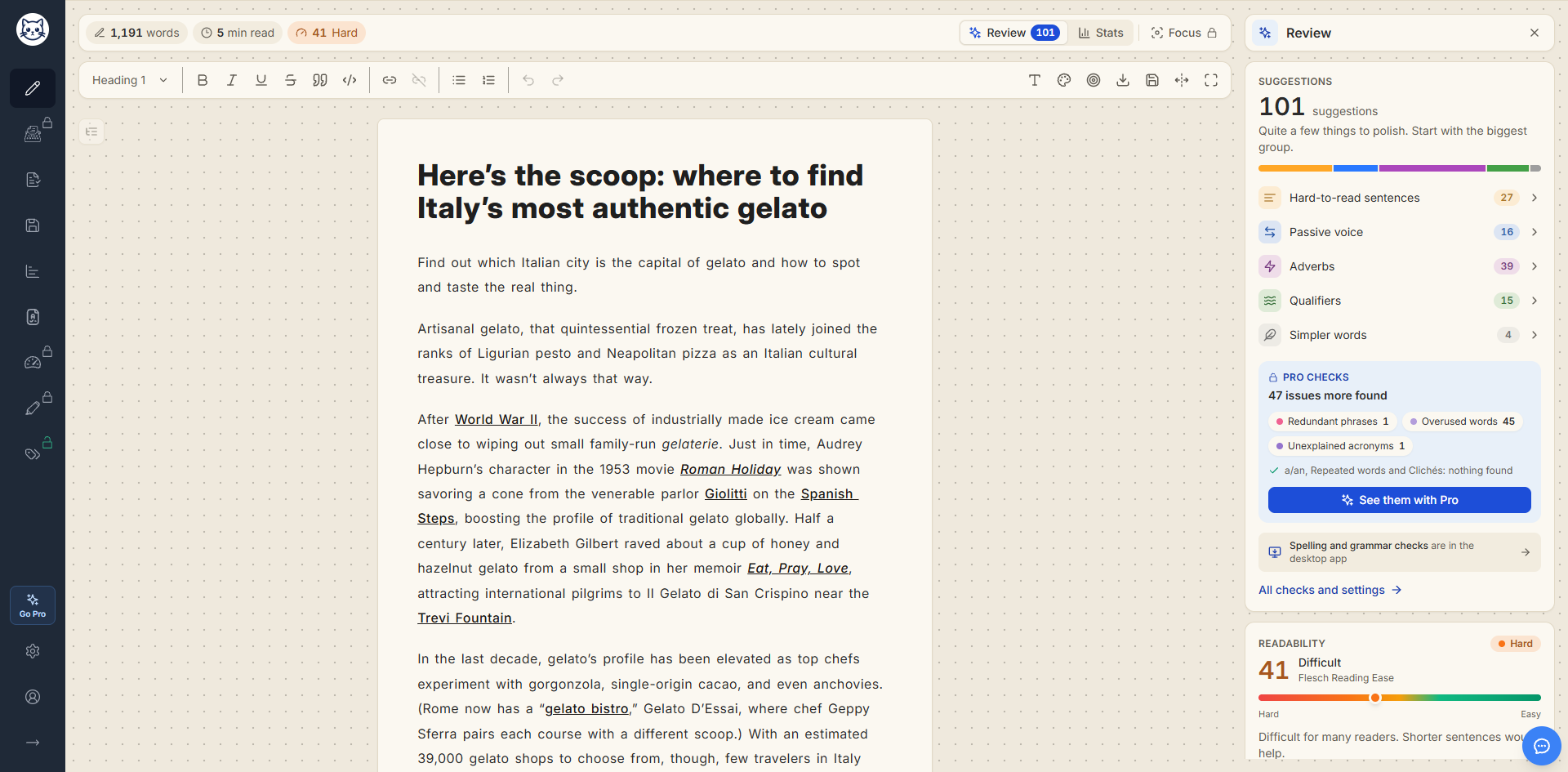
Every suggestion in one list
The Review button in the top bar shows how many suggestions Gorby found, even with the panel closed. Open it, and you’ll see your suggestions grouped by check:
- Free checks: hard-to-read sentences, passive voice, adverbs, qualifiers, and simpler words
- Pro checks: redundant phrases, a/an mistakes, repeated words, overused words, clichés, and unexplained acronyms
Open a check, and its issues light up in your text. Step through them one by one, and the highlights stay in place as you keep writing.
Fix issues right where they are
Using a suggestion is now much easier:
- One-click fixes let you swap in a simpler word, the short version of a redundant phrase, the right article, or one of up to 8 synonyms for an overused word.
- Fix with AI Pro rewrites a hard-to-read sentence, a passive one, a sentence with adverbs, or a cliché. You can simplify, shorten, rephrase, or make it active, and you’ll see a preview before anything changes. It uses 1 AI credit per sentence.
- Ignore hides an issue you want to keep, and every fix is a single undo step, so Ctrl+Z always brings your words back.
Readability, right below your suggestions
The Review panel also shows how readable your text is, with your Flesch Reading Ease score, a plain-language description of what it means, grade level, and average sentence length. With Pro, you get the extra readability scores too.
We also added a narrow text option, a headings outline, and new themes for the editor. On your phone, Review opens as a sheet under your text, so you can keep editing while it’s open.
Smarter Simpler Word Suggestions
The simpler words check now gets it right a lot more often:
- It checks the context. Gorby now looks at how a word is used before suggesting a plainer one, so a suggestion only shows up where it actually fits the sentence.
- A cleaner dictionary. We fixed broken suggestions, removed entries that misfired in fiction, narrowed some ambiguous words down to specific phrases, and added more wordy phrases, British spellings, and verb forms.
- Same results everywhere. The Text Checks & Highlights view now uses the same check as Review, so you get the same suggestions in both places.
Spelling and Grammar Checks in the Desktop App
The desktop app can now check your spelling, typos, grammar, punctuation, capitalization, and word choice. These checks show up in the Review panel next to Gorby’s other checks, and spelling mistakes and typos are underlined as you type.
The checks run on your computer, so they work offline, and your text never leaves your device to be checked. In the Review settings, you can choose your English (American, British, Australian, Canadian, or Indian), set your preferences for things like the Oxford comma, contractions, and title case, and pick the colors and highlight styles you like.
Spelling and grammar checks are part of Gorby Pro and are available in the desktop app only for now.
What’s Coming Next
We’ll keep improving the desktop app and the new Write view based on your feedback, and we’re working on making the checks even more accurate.
Thank You!
This was a big one, and we hope the desktop app and the new Write view make writing and editing in Gorby feel a lot smoother. As always, let us know what you think.
Happy writing!